Nostr identities
The board holds up to eight Nostr identities and signs with them: BIP-340 (Schnorr) event signatures and NIP-44 v2 encryption, computed on the chip. The private keys never leave the device — custody is import-only, and the backup for an imported key is the paper nsec from the software step, not a copy on the host. The same posture the rest of the board applies to passkeys and PGP keys, applied to a social identity that cannot be revoked by anyone.
This guide walks the whole journey through the fapico2 Nostr extension — the browser extension that speaks the board's vendor protocol over WebHID and exposes the standard NIP-07 window.nostr API to web pages. Any Nostr web client that consumes window.nostr can sign through the board.
The companion pages: what the applet is and how it works (architecture, commands, storage), and the book's general using-the-device rules, which the Nostr applet follows for the touch.
0. What you need
- A fapico2 board on the
feat/nostrfirmware or later (the applet ships in the same UF2 as everything else — no separate image). - Chrome, Chromium, Edge or another Chromium-browser version 116 or newer — the extension is MV3 and talks WebHID, which Firefox does not ship.
- Linux only, once: a udev rule so Chrome's WebHID chooser can see the board's vendor HID interface. A custom VID owns no
uaccessby default, and without the rule the device is absent from Chrome's chooser before any extension code runs. The rule ships in the repo:
sudo cp platform/udev/70-fapico2-nostr.rules /etc/udev/rules.d/
sudo udevadm control --reload-rules && sudo udevadm trigger
The rule is scoped to the fa20 vendor ID and deliberately does not match a PID — the board's VID/PID is runtime-writable, and a PID-bound rule would silently stop working after you re-identify the board. The discriminating check: lsusb sees the device but Chrome's chooser does not ⇒ this rule is missing.
1. Install the extension
The extension ships its built dist/ in the repository, so the short path is to load it directly:
git clone https://github.com/eddieoz/fapico2-nostr-extension.git
Then in Chrome: chrome://extensions → enable Developer mode → Load unpacked → select the dist/ folder (not the repo root — the manifest lives in dist/). Pin the "fapico2" action icon to the toolbar.
If you build the extension from source instead, npm ci && npm run build regenerates dist/ (esbuild; target Chrome 116).
Windows/macOS: no udev rule is needed — WebHID grants work from the browser's own permission flow.
2. Connect the board
Click the toolbar icon → Connect. The extension opens a real browser tab for the chooser, because Chromium cancels a device chooser anchored to an action popup. Click Connect there, pick the fapico2 entry, confirm. One thing the connect page says that is worth repeating: the board's security-key interfaces are hidden by the browser's chooser — the fapico2 entry (the vendor interface) is the right one.
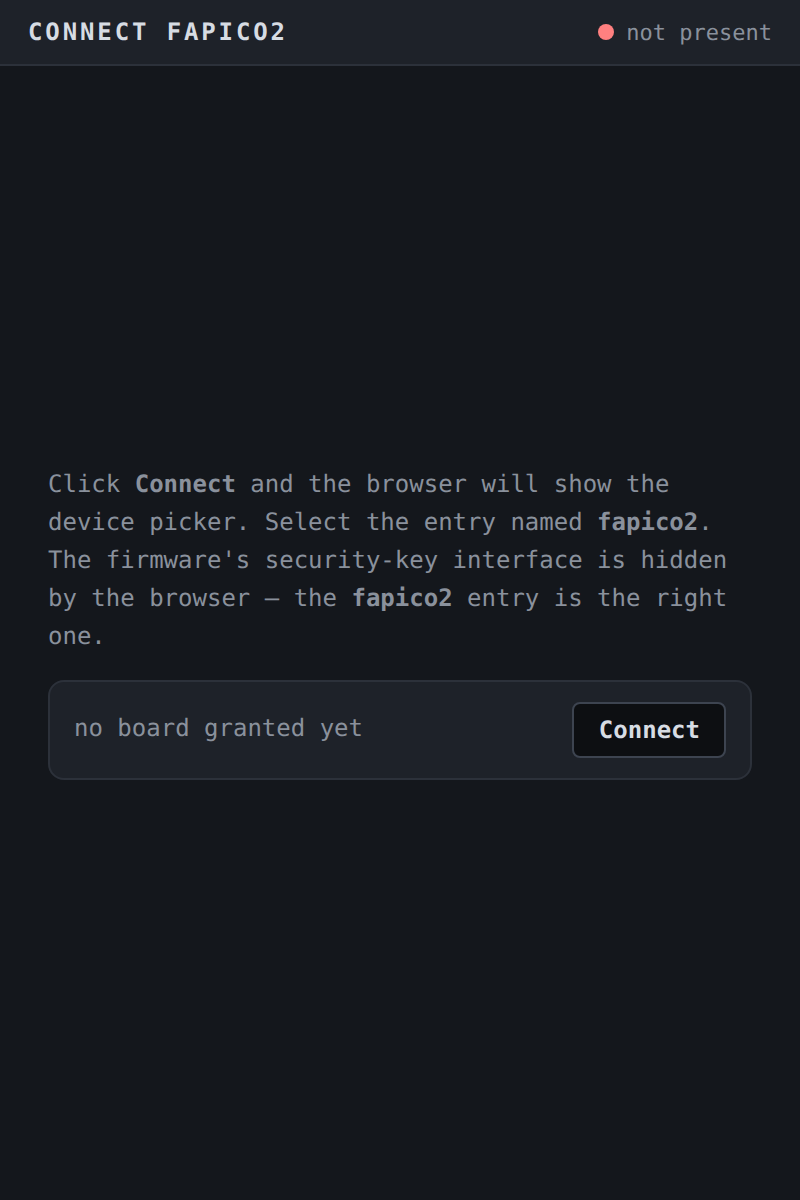
- First run, no keys yet: the page stays open and says connected — open the fapico2 toolbar icon to create your first key.
- Returning user: the page closes itself after a moment and the popup shows the Keys screen.
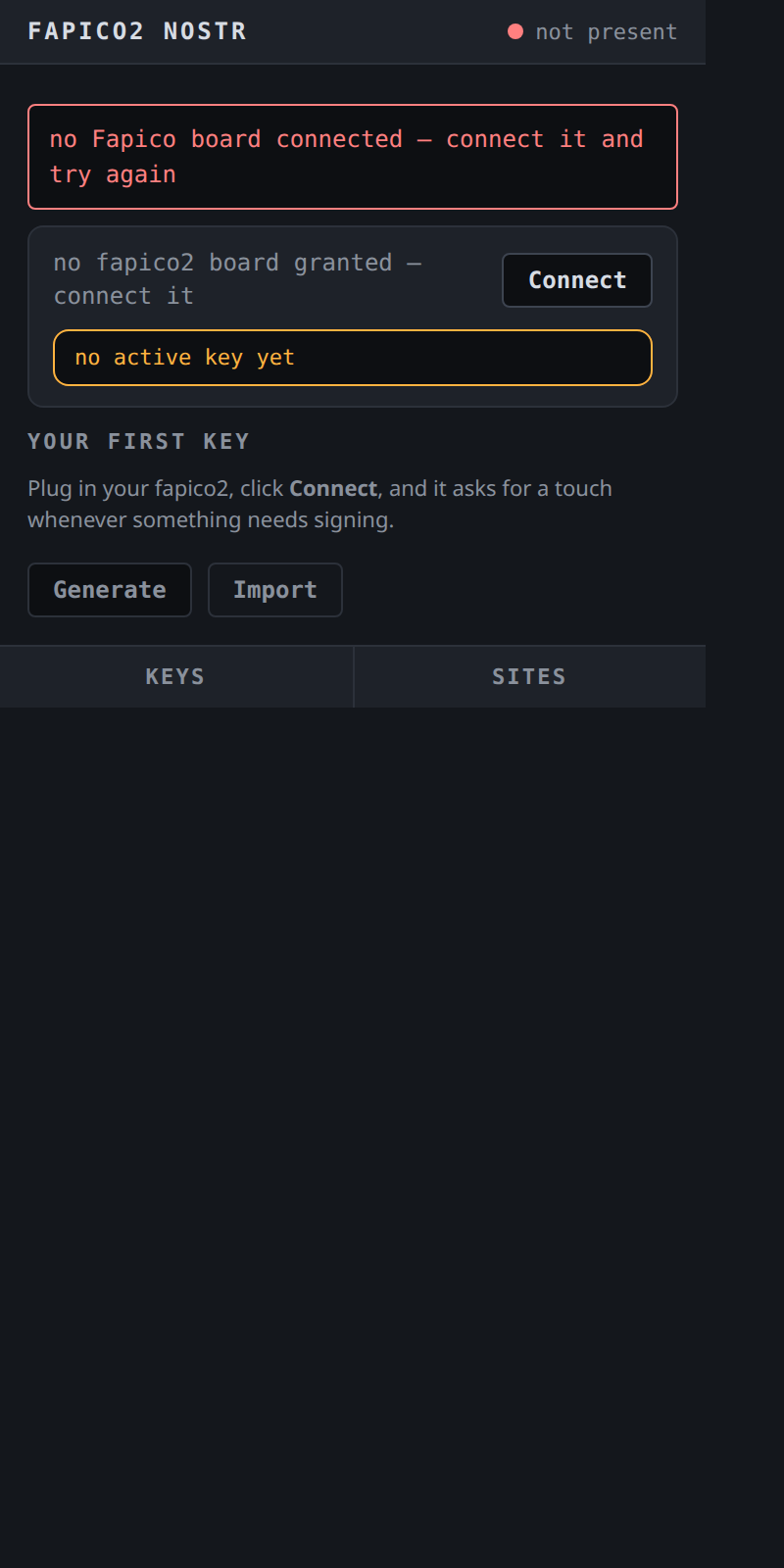
The popup's home state mirrors the board honestly: fapico2 board connected, no fapico2 board granted — connect it, device error — try again (with a Try-again button), or busy — retrying in a second. Until a board is granted, the home screen is the Your first key ritual — Plug in your fapico2, click Connect, and it asks for a touch whenever something needs signing — and key operations stay out of reach; the extension never fakes readiness.
3. Create your first key — the choice that matters
There are two paths, and the README states the trade plainly. Read this before clicking either:
- Recommended — generate in software, write the nsec down, then Import. The paper copy exists before the board is involved, so a lost, bricked or wiped board does not cost the identity. Generate an
nsec1…with any offline Nostr tool, then use Import. This is the only path that produces a backup. - Generate on the device is for a user who has decided the board is the only copy — permanently. Custody is import-only: there is no export command, on any firmware, so a device-generated key can never be read off the board. A lost, wiped or bricked board costs the identity. For anything you cannot afford to lose, use the import path above.
Generate (on the board)
Keys screen → Generate → pick one of the 8 slots → Generate & touch → touch the board's BOOTSEL button when the amber bar says touch your device. The popup confirms key generated in slot N. If no active key is set yet it adds: no active key is set yet; pick it on the Keys screen to sign with it.
Import (from software)
Keys screen → Import → paste an nsec1… bech32 key or a 64-hex scalar into the password field → Check secret (validated locally — the paste is scrubbed from the page the moment it is checked) → the confirm step shows This imports the key that publishes as npub1… and the slot picker → Import & touch → touch the board.
The board derives and echoes the public key (npub) before it accepts the write; an invalid scalar is refused without a touch.
4. The Keys screen
Every identity is listed as its label (or slot N) with a clipped npub. The radio picks the active key — the identity window.nostr publishes as — instantly and without a touch; the notice reads active key is now slot N — sites that cached your other npub will need to reconnect. An occupancy strip (N/8 slots ■■···) shows how much of the set is committed.
Per-key actions live on each row: copy the npub, label it, delete.
Label
Set label accepts up to 32 UTF-8 bytes with a live byte counter (N/32 bytes), gated by Set label & touch. Labels are stored on the board and listed touch-free afterwards — which is why a label is part of the public surface: anything listed without a touch is public.
Delete
Delete key names exactly what it destroys — This destroys name — npub1… (slot N). The key is gone from the device. — and requires the confirmation checkbox I understand this is permanent — the key is destroyed on the device before Delete & touch lights up. After the touch, the board answers with the destroyed identity's npub and the extension verifies the echo — a mismatch is reported as a store fault, never a green checkmark. If you are deleting the active key, the popup warns This is your active key — after deleting, the active key resets to slot 0.
5. The board PIN — session custody
The identity set can sit behind a board PIN. It is optional — a PIN-less board behaves exactly as before — but once set, every command that uses or changes the private key set (sign, encrypt, decrypt, generate, import, delete, label) refuses with session required until you verify. The three reads stay open: an npub is public even from a locked board.
The popup earns its PIN surface from the board's GET_INFO: the PIN row shows the offer while no PIN is set, and the manage entry once custody exists.
- Set — a PIN guards every key on the board: signing asks for it after each restart, and too many wrong tries lock the device. 6 to 64 characters. Validated locally before the board is asked.
- Verify — and note the rule the device enforces: setting the PIN does not open the session — verify it now to unlock signing. If the verify screen appears mid-operation, it names what was interrupted — verify and the "signs events" you started continues where it left off — and the form you were filling resumes after.
- Session lifetime — it stays open until the board restarts. The session is RAM-only on the board: a power cycle closes it (verifying again after a restart is normal, not a fault), unplugging and replugging without a power cut does not, and switching between the extension and a PC/SC tool does not either. The device card shows unlocked — until the board restarts while the session is open; Lock closes it early.
- Change — the current PIN is verified first, a wrong one burns an attempt, exactly like a wrong unlock, and changing the PIN never opens or closes the session.
- Lockout — a wrong PIN has a durable three-attempt budget on the board (it survives restarts). At
0the device is locked and the popup says it plainly: the device is locked — too many wrong PINs. Recovery is a factory reset from the management applet, which destroys every identity on the board. There is no back door; that is what the PIN is for.
The PIN itself is never stored — the board holds a verifier, and the PIN never leaves the host's password field.
The sealing ceremony (one-time, offered, permanent)
On top of the PIN, the popup may offer to seal the identities — the banner appears at connect whenever the board advertises a pending migration (a PIN is set and the ceremony has not run). The dialog discloses, in order: the ceremony seals every identity on the board with a device-bound key — one-time, permanent protection against old-firmware extraction; it is irreversible: once run, the identities can never be read by the old firmware again; it takes at most a minute — leave the board plugged in; the button is not needed; and what a forgotten PIN costs — generated identities are unrecoverable, imported identities come back from your backup file.
Declining is a recorded choice: a dismissible notice (the identities on this board are still readable by the old firmware — the sealing ceremony remains available) stays, and the offer returns at every connect. The firmware never runs it as a side effect — the only command that burns the OTP secret is the explicit one the button sends.
6. Sign from a web page (NIP-07)
Any page can ask the standard API:
const pubkey   = await window.nostr.getPublicKey();
const signed   = await window.nostr.signEvent(event);   // NIP-01 event object
const ciphertext = await window.nostr.nip44.encrypt(peerNpub, plaintext);
const plaintext  = await window.nostr.nip44.decrypt(senderNpub, payload);
const keys     = await window.nostr.listKeys();
The extension deliberately implements no nip04 and no getRelays — it delivers a signer, not a Nostr client. There is no relay pool to configure; publish the signed event with any client or relay library you already use.
What a signature request looks like. The first time a site calls a method, the extension opens a small approval window: the site's host, a chip naming the action (signs events, encrypts for a peer…), a preview of the payload, the identity line (with npub1… (slot N)), the hint Nothing is signed, encrypted or decrypted until you approve, Deny / Approve buttons, and a Remember this choice checkbox. After you approve, the window flips to the amber state — touch your fapico2 board — and the physical press is the final consent. The footnote says it outright: the window approves the request; the touch signs it.
Three properties worth knowing:
- The event is hashed in the browser; only the 32-byte sighash reaches the board. The device returns the 64-byte BIP-340 signature and the npub that produced it — the extension verifies the npub echo, so a board signed with the wrong identity cannot paper over as success.
- The nonce for NIP-44 encryption is generated on the device, never supplied by the host, so no browser bug can reuse one.
- Grants are per site and per action. Remember on "signs events" for
example.comsays nothing aboutother.net, or about "encrypts for a peer" on the same site. Session grants die with the browser session. Manage them on the popup's Sites screen, which lists each host's remembered actions (reads your public key, signs events — 2026-10-13) with per-host revoke and a two-step Revoke all (Confirm revoke all holds for five seconds before it acts).
7. The touch, timeouts, and what the errors mean
The board asks for the BOOTSEL press on every command that uses or changes the private key set — sign, encrypt, decrypt, generate, import, label, delete. The three reads (public key, list, ping) are touch-free. There is no config bit that turns the touch off.
On a PIN-set board there is a gate in front of the touch: an unverified session is refused before the button ever lights, and the popup routes you to the verify screen instead (section 5). A touch you press while the session is closed consents to nothing — the refusal consumes the armed grant, never a signature.
The amber touch bar appears the moment the board asks; keepalives keep it live while the board waits. If no press comes, the device refuses with its touch status word and the extension reports it in plain words:
| The popup says | What actually happened | What to do |
|---|---|---|
| touch timed out — the device asked for a touch and none came | the board's touch window expired (6985) | try again; press when the amber bar pulses |
| that slot is occupied — delete it first | generate/import onto a live slot (6A84) | pick another slot, or delete the occupant |
| that identity is not on the device | the slot is empty or tombstoned (6A82) | check the Keys screen |
| the device refused the data — it could not read the request | malformed payload (6A80) | check what you pasted / the request shape |
| the device refused the command length | the counterparty's key is not a valid curve point (6A87 on the device — the extension's map words it as a length refusal) | check the counterparty's npub |
| the device could not complete the operation — its store faulted | the store refused (6F00) — boot degraded or a slot that would not open | reflash/recovery; see troubleshooting |
| the device does not serve that command | unknown command (6D00) — usually a firmware older than the extension | update the board's firmware |
| your PIN is needed first | a gated command answered 6982 — the session is closed (fresh power-up, or LOCK) | verify the PIN; the interrupted operation resumes |
| wrong PIN — N attempts left | the budget answered (63C1–63C3) | the count is durable; enter the right one |
| the device is locked — too many wrong PINs. Recovery is a factory reset from the management applet, which destroys every identity on the board | 63C0 — the three-attempt budget is spent | deliberate act only; see what management RESET does |
| ceremony interrupted — the worker restarted mid-operation; try again | the extension's background worker restarted | retry once |
| no Fapico board connected — connect it and try again | no granted device at all | Connect first |
There is no silent retry loop for the touch: a refused request stays refused, and a second request waits its turn in a queue instead of stampeding the board.
8. Retiring a compromised key — the order is load-bearing
If an nsec leaks:
- Publish the NIP-09 (or kind-0) retirement event signed by the old key first. It may be the last thing that key ever signs.
DELETE_KEYon the Keys screen, touch-gated (and PIN-verified, when a PIN is set).
Delete first and the retirement event can never be signed by anyone — the identity is stranded, not revoked. The board has no networking stack and cannot do this for you (NIP-46 remote signing is rejected by design). If the paper copy of the leaked key still exists, destroy it deliberately — deleting the key from the board does not un-publish it.
9. What management RESET does
The management applet's RESET destroys all eight Nostr identities along with FIDO, OATH and OpenPGP — the board's PIN dies with them, so a lockout is recoverable by the same act that empties the device. "Reset" means empty, and the host is obligated to enumerate (LIST_KEYS) and show what will be destroyed before you acknowledge. The scoped CTAP2 authenticatorReset (the one a browser or ykman fido reset triggers) wipes only FIDO's range and leaves Nostr records sealed and intact — the device-bound key derivation depends on nothing the FIDO reset destroys.
10. Troubleshooting
The board does not appear in Chrome's chooser. Linux: the udev rule from step 0 is missing (or not reloaded). Check lsusb shows fa20: and re-run the udevadm lines.
The chooser shows the board but Connect fails. Another app may hold the interface; close Yubico Authenticator/ykman for the moment. Then Try again on the popup's device card.
Every touch-gated command answers the touch-timeout sentence. The press went to the wrong interface or nothing was listening — confirm the amber bar was actually pulsing when you pressed. On boards flashed before the presence fixes, the CCID prompt can sit dark while the window is open; re-flash the current image.
Sites cached an old npub after I switched the active key. Expected — the notice said so at switch time. Reconnect the site (re-grant it) and it picks up the new active identity.
"device error — try again" right after unplugging. The next request reopens the transport; one Try-again is usually enough.
The board answers but the extension cannot find it after a reflash. If you changed the board's VID/PID, only the PID is allowed to differ from the rule's expectations — the udev rule keys on the vendor ID alone, so a custom VID is the one change that strands the chooser. Restore fa20 with scripts/fix_usb_identity.py.