fapico2
The F**king Authenticator. Your passkeys, PGP keys and 2FA tokens — on hardware you own.
fapico2 turns a ~$5 Raspberry Pi Pico 2 into a multi-applet hardware authenticator: FIDO2 passkeys, OpenPGP 3.4, OATH (TOTP/HOTP) and YubiKey-protocol OTP served by one firmware, one binary, over one USB composite device. No vendor account, no cloud, no subscription. Written in Rust, licensed AGPLv3 — build it from source or download the prebuilt image.
Read this first
fapico2 is experimental. No audit outside this project has looked at the code, the RP2350 carries no secure element, and what stands between a lab and your keys is the sealing design plus whatever hardening you have burned into the board. Do not put a credential on it whose loss you could not survive. The threat model and security pages name what the chip cannot stop — read them before the first enrolment, not after the first incident.
Keys never touch an online machine
- Generated on the device, and they stay there. Every key comes from the RP2350's hardware TRNG and every signature happens on the chip. Nothing crypto-related ever leaves the board.
- Sealed at rest. Everything is AEAD-encrypted under a root key derived from a one-way-fused OTP row plus the chip's own identity. A flash dump lifted off your board is inert somewhere else — recovering the root key from the chip itself takes physical possession and very sophisticated lab methods, not a USB cable. The same reasoning that keeps bitcoin keys off internet-connected machines applies to the keys that guard your email, your code and your accounts.
- No network. The device build has no network stack at all. There is no channel to exfiltrate through, because there is no channel.
- No one else's copy. A passkey synced to a phone vendor's cloud lives on every device signed into that account, and you trust the vendor's sync to keep it. A resident passkey on fapico2 exists on one board you own.
- Nothing to revoke, no one to trust. No account to suspend, no server to breach, subpoena or shut down. The board answers to you and works as long as the board does.
What it is for
Tired of opening an app and filling in OTPs on every site? Tired of passwords a database leak takes away from you?
Then put them on a board you own: tap it, type your PIN once, and you are in. No app to open, no six digits to copy, no password to remember. Each applet below replaces a habit that leaks — six of the everyday ones.
Passkey logins
Register once in any browser; from then on, login is a touch and the PIN. Room for 848 resident passkeys — a YubiKey 5 holds 100.
Passwordless SSH
Resident -sk keys with verify-required: the private half never touches a disk. Walkthrough.
Linux login
The board answers PAM at the login prompt — a stolen password alone gets nobody in. Walkthrough.
Encrypted to the recipient
OpenPGP 3.4 signs and decrypts from the card: mail and files sealed for one reader, not for the channel. Walkthrough.
Disk encryption gate
The hmac-secret extension hands LUKS its unlock secret only while the board is present and touched. Walkthrough.
Second factor, in your pocket
TOTP and HOTP codes computed on the board, read through Yubico Authenticator — on the laptop or on your phone over a USB cable. The phone holds none of them.
What it does
| App | What you use it for | Transport | Verified with |
|---|---|---|---|
| FIDO2 | passkeys, WebAuthn, SSH (-sk), Linux login | CTAP-HID | Chrome, python-fido2 2.2.1, ykman |
| OpenPGP 3.4 | PGP signing/encryption, SSH auth | CCID | gpg / scdaemon 2.4.4 |
| OATH (YKOATH) | TOTP/HOTP codes | CCID | ykman, Yubico Authenticator |
| OTP | YubiKey-slot OTP | CCID | ykman otp |
| Management | device config, rescue surface | CCID | ykman, PicoForge |
| Nostr | BIP-340 event signing, NIP-44 encryption | vendor HID + CCID | fapico2 Nostr extension |
The board speaks dialects your machine already knows: browsers and ykman over CTAP-HID, GnuPG and Yubico Authenticator over CCID — and your phone talks to it over a USB OTG cable once it claims a Yubico identity. The first hour with the board: Using the device. Deeper walks: the how-tos for SSH and Linux login, end to end.
Capacity
- 848 resident passkeys — measured to refusal on hardware. For scale: a YubiKey 5 holds 100.
- 68 OATH credentials reserved in the key store.
- 8 Nostr identities — BIP-340 signing and NIP-44 encryption, through the browser extension: the applet.
One board replaces a drawer of tokens.
Getting started
The board: one Raspberry Pi Pico 2 (RP2350) — nothing else on the shopping list. What makes a board compatible.
The image: download the prebuilt fapico2.uf2 (sha256 in its release notes) or build from source.
The flash: hold BOOTSEL, plug the board in, copy the UF2 onto the RP2350 drive that mounts, and wait — re-enumeration can take up to a minute and that is normal.
The first login: FIDO2 works in any browser straight away. Linux/macOS only: OpenPGP and OATH need a one-time libccid allowlist edit.
See Getting Started for the full procedure.
Buy me a coffee
fapico2 is free software, built in the open. If it earned its keep, send sats: ⚡ eddieoz@sats4.life
License
GNU AGPLv3 — see LICENSE and NOTICE.
Getting Started
The hardware
One Raspberry Pi Pico 2 (RP2350) and a USB cable. That is all the hardware there is. What "compatible" means and which boards on the market match: Compatible devices.
Where the image comes from
Download the prebuilt fapico2.uf2 from the release (sha256 in its release notes) or build from source — see Contributing for build instructions. A first build takes tens of minutes on Linux/macOS/WSL.
Putting it on the board
The same on every OS — the bootrom presents a USB mass-storage drive:
- Hold BOOTSEL on the Pico 2.
- Plug the board into your computer via USB.
- A drive called
RP2350will mount (Linux:/media/$USER/RP2350; Windows/macOS: theRP2350drive in Explorer/Finder). - Copy
fapico2.uf2onto the drive. - Wait — the board will re-enumerate. This can take up to a minute and is normal.
Linux users who prefer the command line: scripts/bootsel.py reboots a running board into BOOTSEL over the Rescue applet and flashes for you (--bootsel --flash firmware/fapico2.uf2). The Rust build supports physical BOOTSEL only otherwise: hold BOOTSEL while plugging in, or BOOTSEL + tap RESET. Full flashing and recovery reference: docs/bootsel.md.
Talking to it
The board enumerates as fa20:0002 "fapico2", a composite CCID + CTAP-HID device. Set a FIDO2 PIN first (ykman fido access change-pin or the browser prompt): on a PIN-set board every operation requires the PIN and a touch. Then per host:
Linux
- FIDO2 — nothing to install. The kernel's
usbhiddriver picks the board up; Chrome,ykman, and Yubico Authenticator work immediately. - Smartcard applets (OpenPGP, OATH, OTP) need a one-time libccid allowlist edit. libccid has no wildcard, so the reader is invisible to
pcscduntil you append0xFA20/0x0002to theifdVendorID/ifdProductID/ifdFriendlyNamearrays in/etc/libccid_Info.plist(on Debian/Ubuntu,ifd-ccid.bundleis a symlink to that file) and runsudo systemctl restart pcscd. Without it your host sees no smartcard reader at all — that looks like broken hardware and is not. Full procedure:docs/identity.md. - Building from source is native — see Contributing.
macOS
- FIDO2 — works immediately, in Safari, Chrome and libfido2-based tools; no driver step exists on macOS for the HID interface.
- Smartcard applets need the same libccid allowlist edit as Linux — the plist lives wherever libccid is installed on your system. Until then the CCID reader does not appear, which again looks like broken hardware and is not. See
docs/identity.md. - Building from source is native — see Contributing.
Windows
- FIDO2 — works immediately: browsers speak FIDO over HID natively, and no allowlist concept applies.
- Smartcard applets over CCID are not verified on Windows yet — flashing and FIDO2 are the paths we stand behind. If a smartcard client does not see the reader, that is why.
- Building from source: use WSL — a first build takes tens of minutes there. See Contributing.
USB identity
The firmware enumerates as fa20:0002 — manufacturer "The BLOCO Community", product "fapico2". 0xFA20 is not a USB-IF-registered vendor ID, so Linux and macOS need the libccid Info.plist allowlist edited before pcscd sees the CCID reader (CTAP-HID is unaffected everywhere). Production deployments need a registered VID — see the USB identity how-to for changing it on a running board.
First steps after flashing
- Set the FIDO2 PIN — every WebAuthn operation needs it and a touch.
- Register a passkey somewhere you actually log in — see the SSH how-to and the Linux login how-to.
- Enrol your TOTP codes with
ykman oathonce the allowlist edit is done. - Generate your PGP key on the card with
gpg --card-statusandgpg --change-pinfor the card's own PIN.
Compatible devices
fapico2 runs on the Raspberry Pi Pico 2, and today that is both the verified board and the definition of "the board": one board file ships, firmware/boards/pico2.toml, because one board exists.
What a board needs
The firmware pins four things, and a board on the market must match all of them:
| Requirement | Why |
|---|---|
| RP2350 microcontroller | The whole security story — the OTP-derived store key, the bootrom's signed-boot support, the hardware TRNG — lives in the RP2350. An RP2040 (Pico 1, Pico 1 W) does not have any of it and cannot run this firmware. |
| 4 MiB QSPI flash | The flash map — app, keystore partition, dual-slot store — is laid out for 4096 KiB and the linker script is generated from that number. A different flash size means a different board file, not a tweak. |
| BOOTSEL wired the Pico 2 way | Flashing happens through the bootrom's USB mass-storage bootloader; the button read as GPIO1 is what the device's own button input expects. |
| Activity LED on GPIO25 | The Pico 2's default LED pin — the touch prompts and status blinks drive it. |
What is verified
Raspberry Pi Pico 2 — the board every hardware result in the acceptance matrix was captured on: the full OpenPGP ceremony, FIDO2 over CTAP-HID, OATH, management, and flash persistence across power cycles.
Raspberry Pi Pico 2 W — the same RP2350 with the same 4 MiB flash, and the firmware has no network stack, so the radio simply stays unused. It is expected to work but has not been through the matrix; treat it as unverified until someone runs it.
What about other boards?
Anything on the market with an RP2350 and 4 MiB flash is a candidate, not a promise — and we do not list verification we have not done. If you want to bring one up, the second board is a data change, not a code change: copy firmware/boards/pico2.toml, set the LED pin, button pin and flash size, and build with FAPICO2_BOARD=<name>. Unknown keys, pins above GPIO29, or a flash size outside the supported window are hard build failures, so a wrong board file fails loudly instead of flashing something broken. The procedure and the exact file contract are in docs/hardware-matrix.md's board section — and results from a second board belong back in the matrix.
Buying checklist
- RP2350, not RP2040 — the Pico 2 family, or an RP2350 board from another maker that exposes BOOTSEL. Ref: Buy in AliExpress
- 4 MiB flash on board.
- A BOOTSEL button you can hold while plugging in.
- USB-C or micro-USB, whatever the board carries — the firmware is transport-agnostic.
- If you would rather not carry a bare board, a printable case ships in the repository:
3dprint/Raspberry_Pi_Pico_2_W_Case-bloco.3mf.
Using the device
The whole operating model in one paragraph: a board with a PIN set asks for the PIN and a touch on every operation, and nothing in a WebAuthn request can switch either off. That is deliberate — a board that leaves your pocket opens nothing by itself. (On a stock Pico 2, the touch is the BOOTSEL button — the same button that flashes the board.) Everything below is the daily consequence of that one decision.
The default PINs
Two applets ship with factory PINs:
| Surface | Factory default | Change it with |
|---|---|---|
| FIDO2 PIN | none — unset | ykman fido access change-pin, or the browser prompt |
| OATH access code | 123456 | Yubico Authenticator or PicoForge |
| OpenPGP user PIN | 123456 | gpg --change-pin |
| OpenPGP admin PIN | 12345678 | gpg --change-pin, both in one menu |
The OpenPGP card tracks whether its factory values are gone, and while they are in force it refuses to generate, sign or decrypt — so if gpg --card-edit generate errors out on a fresh card, the default PIN is the reason, not a fault. Change both PINs first, then generate. The OATH access code carries the same posture: until you change it, anyone holding the board who tries 123456 gets in. A documented default is the OpenPGP card's way; your changed PIN is the actual defence.
Set the PIN first
Before anything else: ykman fido access change-pin, or accept the PIN prompt the first time a browser enrols the board. The PIN guards every applet's token — makeCredential, getAssertion, credential management, configuration — and derives the permission rules those tokens carry.
Passkeys
Enroll on any WebAuthn site — webauthn.io is the usual first test. The site asks for a touch, the LED confirms, and the credential is generated on the board and stays there. There is room for 848 of them. Sites that offer "sync with your phone" are offering a cloud copy; this board is the non-synced answer.
Managing credentials
Resident keys can be enumerated, renamed and deleted from ykman's fido cred commands or PicoForge's credential manager. Resident SSH keys re-download to any machine with ssh-keygen -K — the key-handle file that lands on disk is a pointer, not a secret. Losing the board means re-enrolling the passkeys — they are non-exportable by design. The one thing that can leave the board is the vendor seed behind the soft lock: the seed backup.
TOTP and HOTP
Add accounts in Yubico Authenticator or ykman oath accounts — after changing the OATH access code, which ships as 123456. The codes are computed on the board when you ask, touch-gated on a PIN-set board — the phone or the laptop holds none of them, which is the point of moving 2FA off an online machine.
Two boundaries worth knowing: the access code is a real lock — until the correct one is presented, LIST and every calculation answer "locked", and it is what survives a power cycle (hardware-verified). The OATH PIN, by contrast, is session state: it does not survive a reboot, so a ykman PIN prompt can reappear after replugging. The access code is the one that guards the applet at rest.
The OpenPGP card
gpg --card-status to meet the card, gpg --card-edit then generate to create the three key slots (sign, encrypt, authenticate) on the chip — the keys are born there and never leave. gpg --change-pin changes the card's PINs — before generate, because the card refuses key operations while its factory PINs are still in force. Encrypt directly to the recipient's key and the message is unreadable to everyone but the holder — no screenshot of a "secure" note, no trusting the channel. Full walks: git commit signing and encrypted mail and files.
On a phone, the same card talks to PGPony and OpenKeychain over a USB OTG cable — PGPony needs its public key paired before it offers the device as a signer.
OTP slots
ykman otp programs the YubiKey-protocol slots, including challenge-response with a touch-gated challenge. Same board, same rule: the secret never leaves.
The LED
Slot and status behavior is configurable from PicoForge. The LED is the only output the board has — worth making it say what you expect.
Factory reset
ykman fido reset wipes the FIDO credentials and the FIDO PIN, and nothing else: the OATH, OTP, OpenPGP and Nostr applets keep their records. (The management applet's full RESET is the stronger act — it wipes Nostr too.) After a reset, the OpenPGP card's serial changes and your host's keyring stubs will point at a card that no longer exists — delete the stale stubs (see what it works with).
Nostr identities
The board holds up to eight BIP-340 Nostr identities and signs with them through the fapico2 Nostr extension — the browser asks, you approve in a small window, and the physical touch signs. The private keys live in the same sealed store as everything else and never leave the board — custody is import-only — and an optional board PIN can put the whole set behind a verify that dies with the power cycle. The full walk: Nostr identities.
No board yet?
The same applet code runs on the host with --features emulation over TCP sockets — it is how every test in ./run_tests.sh exercises FIDO2, OpenPGP and OATH without hardware. It is a test harness, not a polished window, but it answers "does this thing behave as advertised" before any money is spent.
How-tos
End-to-end guides for the things people actually do with the device. Every command here runs against real hardware.
- SSH keys — FIDO2 resident keys for OpenSSH: the private key never leaves the device.
- Linux local authentication — require the device at login with PAM.
- Unlocking disk encryption — LUKS volumes whose secret is derived on the board.
- Signing git commits — signatures from a key that was born on the chip.
- Encrypting to the recipient — mail and files sealed for one reader, with the card.
- The seed backup — the one-shot 24-word phrase that carries the vendor seed off the board; your passkeys are not in it.
- Changing the USB identity — swap the VID:PID from PicoForge or the CLI, without stranding the CCID reader.
- Signed secure boot — sign the firmware and burn the fuse, with every irreversible step named first.
- Nostr identities — hold and sign with BIP-340 Nostr keys through the browser extension: connect, generate or import, sign events, NIP-44 encryption.
More guides land as they are validated on hardware.
SSH keys on fapico2
OpenSSH supports FIDO2 (sk) keys: the private key is generated on the device and never leaves it — the server holds only the public half, and every connection needs the PIN and a touch. A stolen laptop with the key-handle file opens nothing.
What you need
- A fapico2 board, flashed and working, with a FIDO2 PIN set (see Getting Started).
- OpenSSH 8.2 or newer on your machine (
ssh-keygen -t ...sksupport).
Create the key
ssh-keygen -t ecdsa-sk -O verify-required -C "Fapico2-SSH" -O resident -O application=ssh:swarm
Touch the device when it blinks and enter your PIN. Two files land in your working directory:
fapico2_sk— the key handle. This is not the secret; it is a pointer the device resolves. Keep it anywhere.fapico2_sk.pub— the public key. This is what the server gets.
What the flags do:
-O verify-required— every use asks for the PIN and a touch. Without it, a stolen handle plus a touch is enough.-O resident— the credential is stored on the device, so any machine can re-download the handle withssh-keygen -K. Losing the handle file costs nothing.-O application=ssh:swarm— namespaces the key away from the defaultssh:application, so this credential enumerates separately from any otherskkey on the device.
Authorize it on the server
Add the public key to the destination's authorized_keys:
cat fapico2_sk.pub | ssh user@192.168.0.130 'cat >> ~/.ssh/authorized_keys'
or by hand — same content, one line.
Connect
ssh -i ./fapico2_sk 192.168.0.130
The device blinks — touch it, enter your PIN, and you are in. No key file on the client machine is ever sufficient alone.
Recover on a new machine
The credential is resident. On a fresh machine with the device plugged in:
ssh-keygen -K
writes every resident sk key back into the current directory. Your accounts travel with the device, not with the laptop.
Troubleshooting
invalid formaton a sign or connect attempt — the device is waiting for a touch; OpenSSH maps the keepalive cancel to that same string. Touch the device.invalid formatonssh-keygen -Kwith an empty board — a wiped board answersNO_CREDENTIALS, which older libfido2 (1.14.x, Ubuntu's) treats as a hard failure. Register a credential first, or use a newer libfido2.Operation timed out— another client (Yubico Authenticator, a browser) may be holding the device. Close it and retry.
Linux local authentication with fapico2
PAM can require the device at login: plug in, enter the PIN, touch — no password. The key is checked first, so a valid touch + PIN is sufficient on its own, and the password line below it is only reached without the device.
What you need
- A fapico2 board, flashed and working, with a FIDO2 PIN set.
libpam-u2f(provides bothpam_u2f.soandpamu2fcfg):
sudo apt install libpam-u2f
Register the key
sudo mkdir -p /etc/fapico2
pamu2fcfg -r -u "$USER" -N | sudo tee /etc/fapico2/u2f_mappings
Touch the device and enter your PIN. The mapping file records your username and the key's credential ID — one line per user. To add a second key for the same user, run pamu2fcfg again and append both handles on that line, comma-separated.
-r stores a resident (discoverable) credential on the device; -N skips the user-verification request during registration.
Require the key at login
Add this to /etc/pam.d/common-auth, above the existing pam_unix.so line:
# 1. Check FIDO2 key first
auth sufficient pam_u2f.so authfile=/etc/fapico2/u2f_mappings cue pinverification=1 nodetect
What the line does:
sufficient— a valid touch + PIN authenticates on its own; without the device, the password is still accepted.authfile=— where the mappings live.pinverification=1— the PIN is required, so a stolen or borrowed key alone is not enough.cue— prints the touch prompt.nodetect— skips the key-presence pre-check and always runs the full authentication.
Test it
su "$USER" # PIN → touch
You should be asked for the PIN and a touch — no password.
Keep a root shell open while you test. A broken common-auth can lock you out of the machine; with a root shell open you can revert the edit. To revert, remove the line you added.
sudo too
To require the device at sudo the same way, add the same line to /etc/pam.d/sudo. Test it with a second terminal before closing one that holds a root shell.
Unlocking disk encryption with the board
Your disk key should not live on the disk it protects. With LUKS and systemd's FIDO2 support, the volume's unlock secret is derived on the board through the hmac-secret extension: the board is present, the PIN is typed, the button is touched — or the disk stays encrypted. A stolen drive without the board is inert, the same property the key store itself is built on.
What you need
- A Linux host with systemd 249 or newer (
systemd-cryptenroll), and the drive already LUKS-encrypted. - The board set up as in Getting Started, with a PIN.
Enroll the board on a volume
systemd-cryptenroll --fido2-device=auto --fido2-with-client-pin=yes /dev/sdXN
--fido2-device=auto finds the board among your HID devices; the PIN flag matters because this firmware requires the PIN on every operation of a PIN-set board — enrollment ends with a touch on the LED.
Then make systemd ask for the board at boot, in /etc/crypttab:
luks-volume UUID=<uuid> none fido2-device=auto,fido2-with-client-pin=yes
Rebuild your initramfs the way your distribution documents, and unlock once from the console to confirm.
Keep a way back
Enroll a recovery passphrase slot alongside the board and store it offline — systemd-cryptenroll --recovery-key prints one. The board is the fast, strong factor; the recovery key is what turns a lost or dead board into an afternoon, not a destroyed disk. Do not skip this: a resident credential on a dead board was never backed up anywhere, and neither is your disk's only other slot.
What the ceremony looks like
Boot or cryptctl asks for the PIN, then waits at the LED for the touch. There is no "tap once and forget" mode on this firmware — the touch is the physical proof that the person holding the disk also holds the board, and it happens every single unlock.
Signing git commits with the OpenPGP card
A commit's author line is a claim; a signature is the evidence behind it. With the card, the signing key is generated on the chip and never leaves it — your workstation holds only the public half, so a compromised laptop can verify your history but cannot forge it.
One-time: put a signing key on the card
Follow the card setup if you haven't: gpg --card-status, then gpg --card-edit and generate to create the three key slots on the chip. Note the signature key's fingerprint from gpg --card-status, then:
git config --global user.signingkey <signature-key-fingerprint>
git config --global commit.gpgsign true
Sign
git commit              # every commit is signed from now on
git tag -s v1.0         # signed tags, same path
pinentry asks for the card's PIN, the LED waits for the touch, and the signature is produced inside the chip. Anyone can check it:
git log --show-signature
Publish the public half
Keys born on the card cannot be exported — publish the public key so the world can verify you: gpg --armor --export <fingerprint>, then upload it wherever your collaborators and forges look (a keyserver, or your forge's account settings). The private half exists only on the board; that is the property, not a limitation to engineer around.
Rotation and loss
Re-running generate on the card creates a fresh identity in the slots; old signatures verify against the old published key for as long as you keep it published. If the board dies, your signing identity dies with it — plan for that the same way you plan for a lost resident passkey: publish the new key, sign a statement that the identity moved.
Encrypting to the recipient: mail and files
Instead of writing a note, screenshotting it and trusting a channel to keep it safe — encrypt it directly to the recipient's key. The message is unreadable to everyone but the holder of the other key: not the mail provider, not the channel, not a subpoena target. The card makes the private half of your key unusable anywhere but in your hand.
Your card key becomes your identity
After generating the keys on the card, publish the public half:
gpg --armor --export <fingerprint>
Give it to the people who will write to you — attach it, keyserver it, put it in your profile. Verification is the whole point: a public key fingerprint compared out-of-band is what makes "encrypt to the recipient" mean something.
Encrypt a file or a message
gpg --encrypt --recipient friend@example.com note.txt     # -> note.txt.gpg
gpg --decrypt note.txt.gpg                                # card asks PIN, then touch
The decryption private operation runs on the chip; the laptop receives only the plaintext you asked for. Same command for backups, notes, anything at rest — an encrypted archive is worthless to whoever copies the disk, and that is the point.
Mail clients
Any client that uses GnuPG inherits the card automatically. In current Thunderbird, external GnuPG keys are enabled in the Config Editor (mail.openpgp.allow_external_gnupg_key = true); associate the card key with the account and every encrypted mail is a PIN and a touch away. With pcscd in the picture, give scdaemon the room it needs — the two readers otherwise fight over one device.
The honest cost
The card's encryption key is generated there and is not exportable — if the board dies, mail encrypted to that key is gone with it. Keep your correspondents current when you rotate, and treat the board like the single copy of a key it is: back up what can be backed up, and plan recovery for what cannot.
The seed backup
The board holds a 32-byte vendor master seed — the key material behind the soft lock and PicoForge's Backup screen. The firmware can export it once, as a 24-word BIP-39 phrase, and install a phrase (or a fresh seed) on any board running this firmware. Two drivers speak the same channel and print the same words for the same seed: scripts/backup_fido.py on the command line, and PicoForge's Backup screen.
The full record — wire notes, test coverage, failure statuses — is docs/backup-seed.md. This page is what you need to use it.
Your passkeys are not in the phrase, and no tool can export them. Resident credentials derive from different key material (device_random), non-exportable by design. The phrase carries the vendor seed: the lock key. Treat that as a wallet phrase in its own right — anyone holding it can install your seed on their board and, worse, it is the key that opens a locked board. Paper, offline, never a photo or a cloud note.
What it is for, exactly
| Claim | Status |
|---|---|
| Backs up the vendor master seed — the soft-lock key | yes |
| Backs up passkeys / resident credentials | no — non-exportable by design |
| Survives a CTAP2 factory reset on the board | yes — reset clears PIN, credentials and vault state, never the seed |
| Restoring replaces the previous seed | yes, permanently — unless you hold the previous seed's phrase, it is gone |
| The phrase alone opens a locked board | yes — no PIN, no button; the phrase is the second factor |
The four commands
python3 scripts/backup_fido.py status              # read the flags — no touch, no PIN
python3 scripts/backup_fido.py export              # seed → 24 words on stdout (touch)
python3 scripts/backup_fido.py restore --generate  # draw a fresh seed, install, print phrase
python3 scripts/backup_fido.py finalize            # close the export window forever
export --out file.txt writes the phrase to a 0600 file that refuses to overwrite — a drafting aid; paper is the backup. Prose goes to stderr and the phrase to stdout, so piping into a secret store captures exactly the words. restore takes a phrase by hidden prompt, stdin or --file — never argv — and validates the BIP-39 checksum before any wire traffic.
The export window is one-shot
Export stays possible until you run finalize — and the closing is monotonic and durable: the seed can never be exported from that board again. Nothing is erased; a phrase written down before finalize remains a fully working key forever. Finalize protects the board, not the phrase.
One hazard deserves its own warning: a CTAP2 factory reset does not close the window. A reset board still exports whatever vendor seed it holds to the next person to press the button. Never hand a board over without finalizing first.
The procedures
Provision a fresh board (the normal path — no seed yet):
python3 scripts/backup_fido.py restore --generate   # prints the phrase once; write it on paper
python3 scripts/backup_fido.py status              # seed: present, window open
python3 scripts/backup_fido.py finalize            # window closed forever
Back up an already-provisioned board:
python3 scripts/backup_fido.py status              # the window must be open — if it says CLOSED, export has already been taken or refused
python3 scripts/backup_fido.py export --out /dev/shm/fido-seed.txt
# copy to paper, shred the file, then:
python3 scripts/backup_fido.py finalize
Migrate to a replacement board: export on the old board, restore --file on the new one, finalize the new board, delete the file.
Hand a board over: finalize first — or restore --generate && finalize to provision it with a seed nobody holds. Do this every time a board leaves your possession, because the reset does not do it for you.
Recover a locked board: release the soft lock from PicoForge's Lock screen, using the 24-word phrase. The CLI deliberately cannot unlock — the phrase is the second factor, and PicoForge is the intended operator.
On a PIN-set board: use PicoForge
The CLI is touch-only by design — it never asks for a PIN, never mints a token, never charges the three-strike latch. The firmware's own rule (a PIN-set board wants a token and a button) means its gated commands answer 0x36 on a PIN-set board, and no amount of button-pressing changes that. So: PIN-free board, use the CLI as written; PIN-set board, use PicoForge's Backup screen, which mints the token from the PIN. Clearing the PIN with a CTAP2 reset is lossless for the seed — it is not lossless for passkeys, which a reset destroys.
Finding the right board
The tool talks CTAPHID and proves it is a fapico2 board with the MSE handshake — a device that answers the vendor channel's MSE sub-command with a pinUvAuth demand (a YubiKey's reading of 0x41) is refused with a "does not look like a fapico2 board" message instead of proceeding. If the board is invisible altogether, that is the USB identity problem, not the tool's.
Changing the USB identity (VID:PID)
Out of the box the board enumerates as FA20:0002. That vendor ID is not USB-IF-registered, so Linux and macOS need a one-time libccid allowlist edit before the smartcard applets appear. Registering your own identity — or adopting a preset your host already knows — removes that step. You can set it from PicoForge's Configuration screen or from the command line; both write the same record on the device, the change survives a reflash, and it applies at the next USB enumeration.
Before you choose: this is a one-way door
The stored VID:PID overrides the build-time default at enumeration. If you pick a pair your host's CCID driver cannot bind:
- the board still enumerates, but produces no CCID reader at all — OpenPGP, OATH and OTP go quiet, and so does the Rescue applet, the one surface that needs no PIN. The device loses its recovery route.
- PicoForge will not report an error. FIDO keeps working; the badge just turns yellow "Online - FIDO" while the broken thing is the invisible one.
- Reflashing does not undo it. The stored record survives a reflash and wins over the build default.
So check before writing:
python3 scripts/fix_usb_identity.py --list-known
This prints the pairs the local CCID driver can actually bind, read from libccid's own table. On a stock Ubuntu host, for example, only 2E8A:10FF binds out of that vendor's four presets — 2E8A:10FE writes cleanly, persists, and strands the device.
Option 1: PicoForge
- Connect the board and open Configuration.
- Pick an identity — presets include LibreKeys One (
1D50:619B), the Pico Keys family (2E8A:10FD/10FE/10FF,2E8A:0003) and Yubico's (1050:0407and friends). - Apply. PicoForge asks for the device PIN — the identity write is gated behind an admin-permission token, so a borrowed board cannot retarget its own identity.
- Unplug and replug. Verify with
lsusb.
Option 2: the CLI
scripts/fix_usb_identity.py needs python-fido2 and talks over the FIDO carrier, so it works even when CCID is the thing that is broken:
# diagnose: reads the stored record and warns if it is unbindable (no PIN needed)
python3 scripts/fix_usb_identity.py

# repair / set: needs the device PIN
python3 scripts/fix_usb_identity.py --set 1D50:619B
# then unplug and replug — the change applies at the next enumeration
After the change
- Check the host sees it:
lsusbshould show the new pair. - If the new pair is not in libccid's table, do the PC/SC allowlist edit for it — the reader stays invisible to
pcscdotherwise. - To go back:
--set FA20:0002restores the build default.
Phones need a Yubico identity
Phone apps reach the board over a USB OTG cable — the same CCID surface as the desktop; a Pico 2 has no radio. The Android clients worth using are built around YubiKeys, and several only open readers that claim Yubico's identity: Yubico Authenticator on Android will not talk to a board enumerating as FA20:0002, and the OpenPGP apps are written to the same expectation. So the phone is the reason to do this deliberately:
python3 scripts/fix_usb_identity.py --set 1050:0407
or PicoForge → Configuration → the YubiKey 5 preset (it asks for the device PIN and a touch). Unplug, replug, and the phone — OTG cable attached — sees a YubiKey. 1050:0407 is in libccid's table on every mainstream desktop, so unlike the bare default this pair needs no allowlist edit anywhere: the identity swap is what makes both the phone and a stock Linux desktop work with zero host changes.
The rule from below still applies with force: it is Yubico's identity, borrowed for interop on your own board — never in anything you ship.
Which identity to pick
- A vendor ID registered to you (pid.codes and OpenMoko allocate one to open-source projects) is the right answer for anything you distribute.
- Another project's preset is fine for a private board — you inherit whatever allowlist entries that pair already has, and the name that goes with them.
- Yubico's IDs make
ykmanand Yubico Authenticator work with zero host edits, but it is their identity, not ours: use it for interop on your own board, never in anything you ship.
Signed secure boot, end to end
Signed boot makes the RP2350's bootrom refuse any image that is not signed with your key. Firmware substitution — the technique that recovered every secret in the round-2 red-team assessment — stops working, because an attacker can no longer get code onto the chip. It is opt-in (./build-signed.sh), and parts of enabling it burn one-way fuses. Read the disclosures before the commands; the fuses do not read them back.
What it does not do
- It does not stop an attacker who can read the OTP itself. The signing-key fingerprint lives in OTP, and the threat model lists the lab-level attacks (E16, E24) that reach it with no mitigation in current silicon. Signed boot is a strong control, not an absolute one.
- It does not close the debug port. These are two different fuses with two different triggers:
SECURE_BOOT_ENABLEstops firmware substitution, and does nothing to someone attaching a debugger to your firmware. While the debug port is open — on every image published today, by policy until the first-releasetag — an attacker with a probe extracts every key the device holds, signed boot or not. - It does not make the board a secure element. It raises the bar; the ceiling is on the threat model page.
What is irreversible, stated plainly
CRIT1.secure_boot_enableis a one-way OTP fuse. There is no way back — not by reflashing, not through BOOTSEL, not by anyone.- From the moment the fuse is set, the board boots only images signed by the key whose fingerprint is in OTP. If you lose that private key, the board is unbootable, permanently.
- The plain unsigned
fapico2.uf2stops booting on that board — including fresh builds of your own. Anything in your workflow that flashes it will surface as a confusing "board is dead". That is the control working. - Key rotation: the RP2350 has four key slots, and a new image can be signed with a different key while older fingerprints remain accepted — an overlap window. A leaked signing key is a fleet-wide compromise; batch rotations rather than doing them reactively.
Before you start
- Use a spare Pico 2. Walk all five steps on it, and only then set its fuse. Do not learn what step 4 feels like on the board you use daily.
- Back the key up before the fuse, not after. Know where
secrets/secureboot_key.pemlives beforesecure_boot_enableis burned; the backup is worthless afterwards. - Never run this firmware with an SWD debugger attached. A probe that runs (
probe-rs run,gdb … load) makes OTP reads return garbage, and the firmware parks the board on boot. Use the probe to read, never to run — over BOOTSEL if you must validate. - A git-ignored key file is a convenience, not a key store. Anyone who builds on that machine has the signing key in reach. A hardware token, an HSM, or a dedicated signing host is the right answer for keys that guard real boards.
The procedure
1. Build signed
./build-signed.sh
The script generates secrets/secureboot_key.pem if absent (needs picotool on PATH or at PICOTOOL=), signs the image, and fails hard unless three gates pass:
signature: verified
fingerprint cross-check OK (...)
PICOBIN block loop OK (offset ... < 4096)
The third gate matters: the bootrom only scans the first 4 KiB of flash for the PICOBIN block loop, and sealing adds a metadata block — an image whose loop leaves that window is silently refused by BOOTSEL and just sits on the drive. A signed image that won't install is worse than no signature, so the build refuses to produce one.
Outputs: firmware/fapico2.signed.uf2 (this is what you flash), firmware/otp_config.json (the OTP rows to program), firmware/secureboot_public.pem (publishable), firmware/secureboot_fingerprint.txt.
2. Flash the signed image
Hold BOOTSEL, connect, copy firmware/fapico2.signed.uf2 to the mounted RP2350 drive. The drive should eject when the write completes. If it does not, stop — that is the block-loop failure, and the image will never boot.
3. Program the key fingerprint
Write bootkey0 and set boot_flags1.key_valid = 1, both from firmware/otp_config.json, using picotool. The fingerprint is SHA-256 over the 64 raw coordinate bytes of the verifying key — no 0x04 uncompressed-point prefix — which is non-obvious enough that the build recomputes it independently and fails if it disagrees with picotool, because programming the wrong value bricks the board's own firmware. The full detail is in the repository.
At this point the board still boots anything; only the fingerprint is recorded.
4. Set the fuse
This is one-way. There is no way back.
Set OTP CRIT1.secure_boot_enable = 1. From this point the board boots only images signed by the key whose fingerprint is in bootkey0.
5. Verify — both directions
Rebuild and flash the signed image; it boots. Then flash the unsigned firmware/fapico2.uf2 and confirm it does not boot. The negative test is the only way to confirm the fuse took: a fuse that silently failed to set leaves you with the assessment's exposure and none of the protection.
For a release
Per ADR 0002, alpha and beta images keep the debug port available and burn nothing; the closure applies at the first -release tag. Before tagging, against a board flashed from the image being released:
./scripts/check_release_debug_state.sh --class release # must exit 0
A release must read secure boot: 1, debug enable: 0, secure debug enable: 0. The script gates both directions — a pre-release image that reads as closed fails too.
Nostr identities
The board holds up to eight Nostr identities and signs with them: BIP-340 (Schnorr) event signatures and NIP-44 v2 encryption, computed on the chip. The private keys never leave the device — custody is import-only, and the backup for an imported key is the paper nsec from the software step, not a copy on the host. The same posture the rest of the board applies to passkeys and PGP keys, applied to a social identity that cannot be revoked by anyone.
This guide walks the whole journey through the fapico2 Nostr extension — the browser extension that speaks the board's vendor protocol over WebHID and exposes the standard NIP-07 window.nostr API to web pages. Any Nostr web client that consumes window.nostr can sign through the board.
The companion pages: what the applet is and how it works (architecture, commands, storage), and the book's general using-the-device rules, which the Nostr applet follows for the touch.
0. What you need
- A fapico2 board on the
feat/nostrfirmware or later (the applet ships in the same UF2 as everything else — no separate image). - Chrome, Chromium, Edge or another Chromium-browser version 116 or newer — the extension is MV3 and talks WebHID, which Firefox does not ship.
- Linux only, once: a udev rule so Chrome's WebHID chooser can see the board's vendor HID interface. A custom VID owns no
uaccessby default, and without the rule the device is absent from Chrome's chooser before any extension code runs. The rule ships in the repo:
sudo cp platform/udev/70-fapico2-nostr.rules /etc/udev/rules.d/
sudo udevadm control --reload-rules && sudo udevadm trigger
The rule is scoped to the fa20 vendor ID and deliberately does not match a PID — the board's VID/PID is runtime-writable, and a PID-bound rule would silently stop working after you re-identify the board. The discriminating check: lsusb sees the device but Chrome's chooser does not ⇒ this rule is missing.
1. Install the extension
The extension ships its built dist/ in the repository, so the short path is to load it directly:
git clone https://github.com/eddieoz/fapico2-nostr-extension.git
Then in Chrome: chrome://extensions → enable Developer mode → Load unpacked → select the dist/ folder (not the repo root — the manifest lives in dist/). Pin the "fapico2" action icon to the toolbar.
If you build the extension from source instead, npm ci && npm run build regenerates dist/ (esbuild; target Chrome 116).
Windows/macOS: no udev rule is needed — WebHID grants work from the browser's own permission flow.
2. Connect the board
Click the toolbar icon → Connect. The extension opens a real browser tab for the chooser, because Chromium cancels a device chooser anchored to an action popup. Click Connect there, pick the fapico2 entry, confirm. One thing the connect page says that is worth repeating: the board's security-key interfaces are hidden by the browser's chooser — the fapico2 entry (the vendor interface) is the right one.
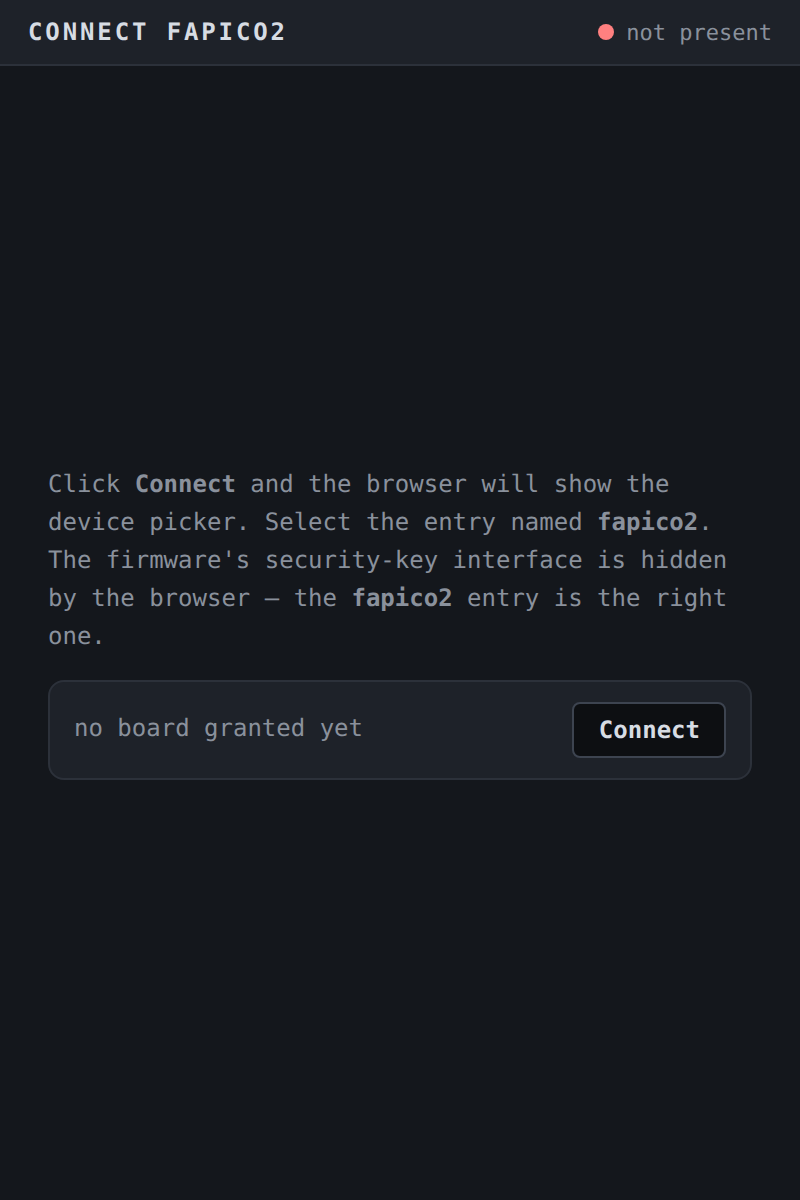
- First run, no keys yet: the page stays open and says connected — open the fapico2 toolbar icon to create your first key.
- Returning user: the page closes itself after a moment and the popup shows the Keys screen.
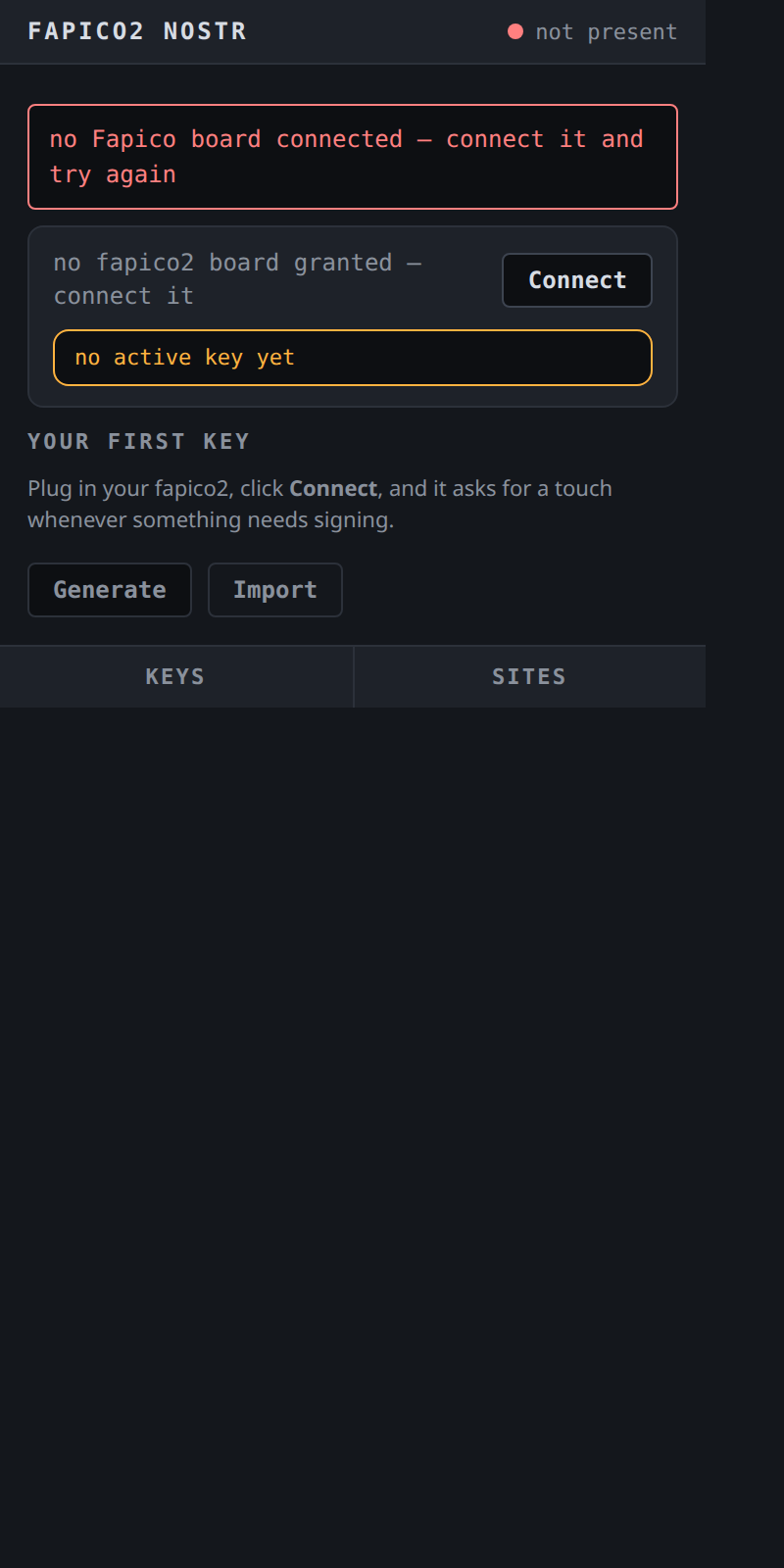
The popup's home state mirrors the board honestly: fapico2 board connected, no fapico2 board granted — connect it, device error — try again (with a Try-again button), or busy — retrying in a second. Until a board is granted, the home screen is the Your first key ritual — Plug in your fapico2, click Connect, and it asks for a touch whenever something needs signing — and key operations stay out of reach; the extension never fakes readiness.
3. Create your first key — the choice that matters
There are two paths, and the README states the trade plainly. Read this before clicking either:
- Recommended — generate in software, write the nsec down, then Import. The paper copy exists before the board is involved, so a lost, bricked or wiped board does not cost the identity. Generate an
nsec1…with any offline Nostr tool, then use Import. This is the only path that produces a backup. - Generate on the device is for a user who has decided the board is the only copy — permanently. Custody is import-only: there is no export command, on any firmware, so a device-generated key can never be read off the board. A lost, wiped or bricked board costs the identity. For anything you cannot afford to lose, use the import path above.
Generate (on the board)
Keys screen → Generate → pick one of the 8 slots → Generate & touch → touch the board's BOOTSEL button when the amber bar says touch your device. The popup confirms key generated in slot N. If no active key is set yet it adds: no active key is set yet; pick it on the Keys screen to sign with it.
Import (from software)
Keys screen → Import → paste an nsec1… bech32 key or a 64-hex scalar into the password field → Check secret (validated locally — the paste is scrubbed from the page the moment it is checked) → the confirm step shows This imports the key that publishes as npub1… and the slot picker → Import & touch → touch the board.
The board derives and echoes the public key (npub) before it accepts the write; an invalid scalar is refused without a touch.
4. The Keys screen
Every identity is listed as its label (or slot N) with a clipped npub. The radio picks the active key — the identity window.nostr publishes as — instantly and without a touch; the notice reads active key is now slot N — sites that cached your other npub will need to reconnect. An occupancy strip (N/8 slots ■■···) shows how much of the set is committed.
Per-key actions live on each row: copy the npub, label it, delete.
Label
Set label accepts up to 32 UTF-8 bytes with a live byte counter (N/32 bytes), gated by Set label & touch. Labels are stored on the board and listed touch-free afterwards — which is why a label is part of the public surface: anything listed without a touch is public.
Delete
Delete key names exactly what it destroys — This destroys name — npub1… (slot N). The key is gone from the device. — and requires the confirmation checkbox I understand this is permanent — the key is destroyed on the device before Delete & touch lights up. After the touch, the board answers with the destroyed identity's npub and the extension verifies the echo — a mismatch is reported as a store fault, never a green checkmark. If you are deleting the active key, the popup warns This is your active key — after deleting, the active key resets to slot 0.
5. The board PIN — session custody
The identity set can sit behind a board PIN. It is optional — a PIN-less board behaves exactly as before — but once set, every command that uses or changes the private key set (sign, encrypt, decrypt, generate, import, delete, label) refuses with session required until you verify. The three reads stay open: an npub is public even from a locked board.
The popup earns its PIN surface from the board's GET_INFO: the PIN row shows the offer while no PIN is set, and the manage entry once custody exists.
- Set — a PIN guards every key on the board: signing asks for it after each restart, and too many wrong tries lock the device. 6 to 64 characters. Validated locally before the board is asked.
- Verify — and note the rule the device enforces: setting the PIN does not open the session — verify it now to unlock signing. If the verify screen appears mid-operation, it names what was interrupted — verify and the "signs events" you started continues where it left off — and the form you were filling resumes after.
- Session lifetime — it stays open until the board restarts. The session is RAM-only on the board: a power cycle closes it (verifying again after a restart is normal, not a fault), unplugging and replugging without a power cut does not, and switching between the extension and a PC/SC tool does not either. The device card shows unlocked — until the board restarts while the session is open; Lock closes it early.
- Change — the current PIN is verified first, a wrong one burns an attempt, exactly like a wrong unlock, and changing the PIN never opens or closes the session.
- Lockout — a wrong PIN has a durable three-attempt budget on the board (it survives restarts). At
0the device is locked and the popup says it plainly: the device is locked — too many wrong PINs. Recovery is a factory reset from the management applet, which destroys every identity on the board. There is no back door; that is what the PIN is for.
The PIN itself is never stored — the board holds a verifier, and the PIN never leaves the host's password field.
The sealing ceremony (one-time, offered, permanent)
On top of the PIN, the popup may offer to seal the identities — the banner appears at connect whenever the board advertises a pending migration (a PIN is set and the ceremony has not run). The dialog discloses, in order: the ceremony seals every identity on the board with a device-bound key — one-time, permanent protection against old-firmware extraction; it is irreversible: once run, the identities can never be read by the old firmware again; it takes at most a minute — leave the board plugged in; the button is not needed; and what a forgotten PIN costs — generated identities are unrecoverable, imported identities come back from your backup file.
Declining is a recorded choice: a dismissible notice (the identities on this board are still readable by the old firmware — the sealing ceremony remains available) stays, and the offer returns at every connect. The firmware never runs it as a side effect — the only command that burns the OTP secret is the explicit one the button sends.
6. Sign from a web page (NIP-07)
Any page can ask the standard API:
const pubkey   = await window.nostr.getPublicKey();
const signed   = await window.nostr.signEvent(event);   // NIP-01 event object
const ciphertext = await window.nostr.nip44.encrypt(peerNpub, plaintext);
const plaintext  = await window.nostr.nip44.decrypt(senderNpub, payload);
const keys     = await window.nostr.listKeys();
The extension deliberately implements no nip04 and no getRelays — it delivers a signer, not a Nostr client. There is no relay pool to configure; publish the signed event with any client or relay library you already use.
What a signature request looks like. The first time a site calls a method, the extension opens a small approval window: the site's host, a chip naming the action (signs events, encrypts for a peer…), a preview of the payload, the identity line (with npub1… (slot N)), the hint Nothing is signed, encrypted or decrypted until you approve, Deny / Approve buttons, and a Remember this choice checkbox. After you approve, the window flips to the amber state — touch your fapico2 board — and the physical press is the final consent. The footnote says it outright: the window approves the request; the touch signs it.
Three properties worth knowing:
- The event is hashed in the browser; only the 32-byte sighash reaches the board. The device returns the 64-byte BIP-340 signature and the npub that produced it — the extension verifies the npub echo, so a board signed with the wrong identity cannot paper over as success.
- The nonce for NIP-44 encryption is generated on the device, never supplied by the host, so no browser bug can reuse one.
- Grants are per site and per action. Remember on "signs events" for
example.comsays nothing aboutother.net, or about "encrypts for a peer" on the same site. Session grants die with the browser session. Manage them on the popup's Sites screen, which lists each host's remembered actions (reads your public key, signs events — 2026-10-13) with per-host revoke and a two-step Revoke all (Confirm revoke all holds for five seconds before it acts).
7. The touch, timeouts, and what the errors mean
The board asks for the BOOTSEL press on every command that uses or changes the private key set — sign, encrypt, decrypt, generate, import, label, delete. The three reads (public key, list, ping) are touch-free. There is no config bit that turns the touch off.
On a PIN-set board there is a gate in front of the touch: an unverified session is refused before the button ever lights, and the popup routes you to the verify screen instead (section 5). A touch you press while the session is closed consents to nothing — the refusal consumes the armed grant, never a signature.
The amber touch bar appears the moment the board asks; keepalives keep it live while the board waits. If no press comes, the device refuses with its touch status word and the extension reports it in plain words:
| The popup says | What actually happened | What to do |
|---|---|---|
| touch timed out — the device asked for a touch and none came | the board's touch window expired (6985) | try again; press when the amber bar pulses |
| that slot is occupied — delete it first | generate/import onto a live slot (6A84) | pick another slot, or delete the occupant |
| that identity is not on the device | the slot is empty or tombstoned (6A82) | check the Keys screen |
| the device refused the data — it could not read the request | malformed payload (6A80) | check what you pasted / the request shape |
| the device refused the command length | the counterparty's key is not a valid curve point (6A87 on the device — the extension's map words it as a length refusal) | check the counterparty's npub |
| the device could not complete the operation — its store faulted | the store refused (6F00) — boot degraded or a slot that would not open | reflash/recovery; see troubleshooting |
| the device does not serve that command | unknown command (6D00) — usually a firmware older than the extension | update the board's firmware |
| your PIN is needed first | a gated command answered 6982 — the session is closed (fresh power-up, or LOCK) | verify the PIN; the interrupted operation resumes |
| wrong PIN — N attempts left | the budget answered (63C1–63C3) | the count is durable; enter the right one |
| the device is locked — too many wrong PINs. Recovery is a factory reset from the management applet, which destroys every identity on the board | 63C0 — the three-attempt budget is spent | deliberate act only; see what management RESET does |
| ceremony interrupted — the worker restarted mid-operation; try again | the extension's background worker restarted | retry once |
| no Fapico board connected — connect it and try again | no granted device at all | Connect first |
There is no silent retry loop for the touch: a refused request stays refused, and a second request waits its turn in a queue instead of stampeding the board.
8. Retiring a compromised key — the order is load-bearing
If an nsec leaks:
- Publish the NIP-09 (or kind-0) retirement event signed by the old key first. It may be the last thing that key ever signs.
DELETE_KEYon the Keys screen, touch-gated (and PIN-verified, when a PIN is set).
Delete first and the retirement event can never be signed by anyone — the identity is stranded, not revoked. The board has no networking stack and cannot do this for you (NIP-46 remote signing is rejected by design). If the paper copy of the leaked key still exists, destroy it deliberately — deleting the key from the board does not un-publish it.
9. What management RESET does
The management applet's RESET destroys all eight Nostr identities along with FIDO, OATH and OpenPGP — the board's PIN dies with them, so a lockout is recoverable by the same act that empties the device. "Reset" means empty, and the host is obligated to enumerate (LIST_KEYS) and show what will be destroyed before you acknowledge. The scoped CTAP2 authenticatorReset (the one a browser or ykman fido reset triggers) wipes only FIDO's range and leaves Nostr records sealed and intact — the device-bound key derivation depends on nothing the FIDO reset destroys.
10. Troubleshooting
The board does not appear in Chrome's chooser. Linux: the udev rule from step 0 is missing (or not reloaded). Check lsusb shows fa20: and re-run the udevadm lines.
The chooser shows the board but Connect fails. Another app may hold the interface; close Yubico Authenticator/ykman for the moment. Then Try again on the popup's device card.
Every touch-gated command answers the touch-timeout sentence. The press went to the wrong interface or nothing was listening — confirm the amber bar was actually pulsing when you pressed. On boards flashed before the presence fixes, the CCID prompt can sit dark while the window is open; re-flash the current image.
Sites cached an old npub after I switched the active key. Expected — the notice said so at switch time. Reconnect the site (re-grant it) and it picks up the new active identity.
"device error — try again" right after unplugging. The next request reopens the transport; one Try-again is usually enough.
The board answers but the extension cannot find it after a reflash. If you changed the board's VID/PID, only the PID is allowed to differ from the rule's expectations — the udev rule keys on the vendor ID alone, so a custom VID is the one change that strands the chooser. Restore fa20 with scripts/fix_usb_identity.py.
Features
What the device does, and proof that it does it. Everything listed here is implemented and verified against real clients; nothing on this page is a promise. Every term is explained on the FAQ.
The device at a glance
| App | What you use it for | Transport | Verified with |
|---|---|---|---|
| FIDO2 | passkeys, WebAuthn, SSH (-sk), Linux login | CTAP-HID | Chrome, python-fido2 2.2.1, ykman |
| OpenPGP 3.4 | PGP signing/encryption, SSH auth | CCID | gpg / scdaemon 2.4.4 |
| OATH (YKOATH) | TOTP/HOTP codes | CCID | ykman, Yubico Authenticator |
| OTP | YubiKey-slot OTP, challenge-response | CCID | ykman otp |
| Management | device config, rescue surface | CCID | ykman, PicoForge |
| Nostr | BIP-340 event signing, NIP-44 v2 encryption for Nostr identities | vendor HID (usage page 0xFF00) + CCID | fapico2 Nostr extension, end-to-end on hardware — the applet · the how-to |
FIDO2 / WebAuthn
- Passkeys (WebAuthn) over CTAP 2.1 — verified with Chrome, python-fido2 2.2.1, ykman and Yubico Authenticator
- 848 discoverable credentials (resident keys) — measured to refusal on hardware (8 slots of the original range are the Nostr reservation)
- Credential management: enumerate, rename, delete — via ykman or PicoForge
- Extensions: hmac-secret, credProtect, credBlob, largeBlobKey, minPinLength
- Large blobs (
authenticatorLargeBlobs) - User presence enforcement through the physical button; user verification with PIN
- ES256 (ECDSA over P-256) — the algorithm every client requests first, and the one the device path signs with
- Permissions enforced on every token: MC, GA, CM, ACFG, LBW
- Authenticator configuration; vendor configuration
- Seed backup: the vendor seed — the soft-lock key — exports once, as a 24-word phrase, and installs on any board; passkeys themselves are non-exportable by design — the procedure
- Enterprise attestation (
enterpriseAttestation): a listed enterprise RP can request identifying attestation - Signature counters: a persistent per-credential counter increments on every assertion
- Sealed store: credentials survive a reflash, and a flash dump alone is inert
OATH (YKOATH)
- TOTP and HOTP — 68 credentials reserved in the key store
- Access-code locking — until the correct access code is presented, the applet answers "locked"; it persists across power cycles (hardware-verified)
- Challenge-response generation, touch-gated
- Yubico Authenticator and ykman compatible
OTP
- YubiKey-slot OTP — the YubiKey one-time-password protocol over CCID
- Challenge-response generation, touch-gated challenge
ykman otpcompatible
OpenPGP 3.4
- OpenPGP card specification v3.4 — 3 key slots (Signature, Encryption, Authentication)
- RSA (2048, 3072, 4096), Ed25519, Curve25519, ECDSA (NIST P-256, P-384, P-521), secp256k1, Brainpool P-256r1
- Key generation on device; key import; public-key and certificate export
- PIN and Admin PIN protection; reset and unblock — via the admin PIN or a dedicated reset code
- Works with GnuPG, SSH and compatible tools over CCID
Nostr
- Up to 8 Nostr identities — BIP-340 (Schnorr) signing and NIP-44 v2 encryption, computed on the chip; the full tour is the applet page, the walk-through is the how-to
- NIP-07
window.nostrfor web pages —getPublicKey,signEvent,nip44.encrypt/decrypt,listKeys— via the fapico2 Nostr extension over WebHID (Chrome 116+, usage page0xFF00) - Touch on every private-key operation — sign, encrypt, decrypt, generate, import, label, delete, export; only the public reads are touch-free, and no config bit changes that
- Keys sealed as AEAD records in the key store under the chip-unique OTP root — the same at-rest story as passkeys (why device-bound)
- The event is hashed in the browser; only the 32-byte sighash reaches the board, and the signature comes back with the npub that produced it
Platform
- Signed secure boot (opt-in,
./build-signed.sh): the bootrom refuses unsigned images - Master key in OTP: the store key derives from a one-way-fused OTP row — nothing that seals the device lives in flash
- Rescue interface: reboot a running board into the mass-storage bootloader without auth or a button
- LED slot configuration via PicoForge
Capacity
| Resource | Capacity | Notes |
|---|---|---|
| FIDO2 resident passkeys | 848 | Measured to refusal on hardware; 8 slots of the original 856 range are the Nostr reservation |
| OATH credentials | 68 | Reserved in the key store |
| Nostr identities | 8 | The Nostr applet |
For scale: a YubiKey 5 holds 100 resident passkeys.
The Nostr applet
The board signs and encrypts for Nostr identities — up to eight BIP-340 (Schnorr) key pairs held on the chip, sealed in flash like every other key the device owns. Signatures and NIP-44 v2 ciphertexts are computed on the RP2350; the private keys never leave the board — custody is import-only, enforced by the absence of any export command — and the whole identity set can sit behind a board PIN (ADR 0006). This page is the implementation tour: what was built, how the transports work, where the keys live, and which decisions are deliberate. The user-facing walk is the Nostr how-to.
Why an applet for a social identity
A Nostr identity is a publishing identity: non-revocable and recoverable by no one. Whoever holds the secret key is the identity — there is no customer support. That makes it the same class of secret as a bitcoin key, and the board's whole design premise (why self-custody) applies verbatim: keys generated on the device, sealed at rest under a chip-unique root, used only on the chip, and gated by a physical press.
Two consequences shaped the design, both recorded in ADR 0005:
- Keys are device-bound, not PIN-bound. The record key derives from the OTP row plus the chip ID — nothing
authenticatorResetor managementRESETcan destroy — so a forgotten-PIN recovery cannot strand the records sealed under a key that no longer exists. (The derivation deliberately takes no PIN input; the ADR records the two bad outcomes that killed the user-bound draft.) - A second secp256k1 implementation ships on purpose. BIP-340 signing and the NIP-44 ECDH run on
secp256kfunbeside the platform-owned curve code, because routing through the trussed client would drag in the heap and a backend crate the applet may not name. The decision is gated on a measurement (25,046 B oftextagainst 44 KB of deliberate headroom), not a projection.
The command surface
One applet, two transports. Over CCID the applet is selected by AID F0 00 00 00 02 and speaks plain ISO-7816 APDUs — the INS column below. Over USB HID it answers a third interface (interface 3, vendor usage page 0xFF00) speaking CTAPHID framing with vendor command bytes 0x40–0x4E and a CBOR payload — the byte column. Same applet, same consent rules, two clients:
| Command | CCID INS | HID vendor byte | Touch? | Request → response |
|---|---|---|---|---|
GET_INFO | 0x10 | 0x40 (PING) | no | — → version, caps, flags, max plaintext, live count |
LIST_KEYS | 0x11 | 0x45 | no | — → n, then per identity: idx, flags, npub, label |
GET_PUBKEY | 0x12 | 0x41 | no | — → npub(32) + bech32 npub1…(63) |
GENERATE_KEY | 0x13 | 0x46 | touch | — → npub(32) |
IMPORT_KEY | 0x14 | 0x47 | touch | scalar(32) → npub(32) |
SIGN | 0x15 | 0x42 | touch | sighash(32) → npub(32) ‖ sig(64) |
NIP44_ENCRYPT | 0x16 | 0x43 | touch | peer_x(32) ‖ plaintext → 0x02 ‖ nonce(32) ‖ ct ‖ mac(32) |
NIP44_DECRYPT | 0x17 | 0x44 | touch | sender_x(32) ‖ payload → plaintext |
SET_LABEL | 0x18 | 0x4A | touch | utf8(≤32) → — |
DELETE_KEY | 0x19 | 0x49 | touch | — → the destroyed identity's npub(32) |
VERIFY_PIN | 0x1B | 0x4B | no | pin(6..64) → — ; opens the session |
SET_PIN | 0x1C, P1 0x00 | 0x4C | no | pin(6..64) → — |
CHANGE_PIN | 0x1C, P1 0x01 | 0x4C | no | lc(1) ‖ current ‖ new → — |
LOCK | 0x1D | 0x4D | no | — → — ; closes the session |
CEREMONY_START | 0x1E | 0x4E | no | — → migrated(2 BE) ‖ already(2 BE) |
The PIN verbs are touch-free by design — the PIN is the consent — and the ceremony's consent is its dialog plus its own refusal gates (below), not the button. EXPORT_KEY (0x1A/0x48) is retired (US-1699): the constant survives so the negative tests can name the byte, but the dispatcher has no arm for it and it answers 6D00 on every transport, on every board, with no grandfathering. On a PIN-set board the six touch-gated commands answer 6982 before the touch check until VERIFY_PIN opens a session — see PIN custody.
The command surface is fixed in apps/nostr/src/lib.rs:108-160; the HID vendor-byte mapping is firmware/src/nostr_wire.rs:121-146. SIGN answers with the npub alongside the signature (apps/nostr/src/lib.rs:721-726) — a host that signed against the wrong identity cannot paper over it, because the answer names the key that produced the signature.
Three touch-free reads, and only three. An npub is public; a label is owner-authored text — listed without a touch, so a label is part of the public surface by definition. Everything that uses or changes the private set presses the button, and no config bit turns that off.
                ┌────────────────────────── one NostrApp ──────────────────────────┐
                │                                                                  │
 Chrome / WebHID│  CTAPHID vendor commands 0x40–0x4A          CCID APDUs by AID    │  PC/SC, scripts
   extension ───┤  (CBOR [idx, arg] payloads)                  (00 1x P1 P2 Lc …)  ├─── ykman-style tools
                │        │                                            │            │
                │  firmware/src/nostr_wire.rs               platform/src/dispatch.rs │
                │  decode_request → build_apdu ──────────────►  App::process(data‖sw) │
                │        │                                            │            │
                │        └────────────┬───────────────────────────┘            │
                │                     ▼                                        │
                │  NostrViaMutex (firmware/src/nostr_shared.rs)                │
                │  one embassy Mutex around the applet; touch wait OUTSIDE it  │
                │                     │                                        │
                │                     ▼                                        │
                │  NostrRegion store (platform/src/keyregion/nostr_store.rs)   │
                └──────────────────────────────────────────────────────────────────┘
The touch, in three tag domains
The applet's consent model is the device's usual one — a press — extended to a board with two Nostr transports and a FIDO interface on the same USB device. The rule that makes one button safe across all three: every pending touch is tagged with the domain it belongs to, and a grant can only be consumed by its own domain. The domains are disjoint by construction (apps/nostr/src/lib.rs:1362-1400):
| Domain | Tag | Bound to |
|---|---|---|
| Nostr over CCID | 0x4000_0000 ‖ idx | the identity index — a press consents to this identity's command |
| Nostr over HID | 0x6000_0000 ‖ CID | the extension's CTAPHID channel (allocator clamped below 0x2000_0000 so the OR-fold stays injective, firmware/src/ctap_hid.rs:503-514) |
| FIDO | 0x8000_0000 ‖ CID | the CTAP-HID channel, untouched |
 press ──► PresenceService (single pending slot, anti-harvest discard)
             │
             ├── CCID arm: blocking wait under the command's own tag (~15 s window)
             │    └─ steady LED for the whole wait; sampled in-line at ~5 ms
             ├── Nostr-HID arm: park the request, keepalives (250 ms, "up needed"),
             │    └─ press consumed by the next re-drive; refusal envelope on expiry
             └── grant dies with its request — CANCEL and expiry drop an armed press
                  (a press made for a cancelled command authorizes nothing)
Three behaviours are worth knowing because audits found them missing once (docs/nostr-presence-audit.md, 2026-10-12):
- An armed grant dies with its request. A press made while command A was pending does not survive A's cancellation to authorize a later command B on the same channel (the audit's one Critical finding, PoC-confirmed; fixed in
platform/src/presence.rs:122-169). - The domain check is exact, not a mask. The Nostr grant accepts only tags whose top three bits are exactly
0x6000_0000(firmware/src/presence.rs:839-841) — a folded FIDO tag must never pass as a Nostr grant. - The HID arm refuses, it does not queue. A second vendor command while a touch window is open answers the touch status word immediately, without running the applet (
firmware/src/hid_serve.rs:1747-1755). The extension does its own FIFO queuing on top.
The windows: 15 s for the Nostr HID window (NOSTR_TOUCH_WINDOW_MS, firmware/src/hid_serve.rs:166-178 — deliberately shorter than CTAP2's 30 s, so a flappy browser tab cannot hold the single consent slot against a WebAuthn ceremony), and a ~10 s blocking wait on CCID in the OpenPGP PSO shape (firmware/src/button.rs:154-159). A press is what consents to the identity, not to the opcode — a confused press can consent to the wrong command on the right identity, and the design answers that by layering a second consent in the client (the extension's confirmation dialogs) rather than by weakening the tag. The one command a confused press could once have turned a "sign" into — export — no longer exists (US-1699); the worst a press can now approve is a delete, and deletes confirm in a checkbox first.
Where the keys live
Eight slots carved from the top of what was FIDO's range, so every existing passkey's address stays stable while the region remains fully tiled (platform/src/keyregion/mod.rs:184-249):
| Quantity | Value | Notes |
|---|---|---|
| Nostr slots | 8 | NOSTR_CAPACITY |
| Record body | 97 B | scalar(32) ‖ npub(32) ‖ label(32) ‖ flags(1), fixed width |
| Sealed record | ≤ 125 B | AEAD overhead included |
| FIDO capacity impact | 856 → 848 | measured to refusal at the carved geometry (docs/capacity.md:144-148) |
Each identity is one AEAD-sealed record whose additional authenticated data binds domain, slot and generation — a Nostr record physically cannot open as a FIDO or OATH record, and a record from another board cannot open here (platform/src/keyregion/nostr_store.rs:26-50). The store is stricter than OATH's for one reason: Nostr's slots were FIDO's until the carve, so every write runs an occupancy guard — a slot that is not virgin must open successfully as a Nostr record before it is reused. A stale FIDO passkey sitting in the carved range is refused as occupied (6A84), not silently overwritten. Deletes commit tombstones (one zero byte — never a valid scalar), and a slot that carries the Nostr tag but will not open is deletable through a force-tombstone, so one corrupt byte cannot strand 12.5 % of the set.
PIN custody and the session
The identity set can sit behind a board PIN (apps/nostr/src/lib.rs US-1690..1706, ADR 0006). The design facts, in the order they matter:
- The PIN is never stored. The record is a 49-byte sealed verifier — the same AEAD discipline as every identity record, keyed by the device like the rest. A flash dump yields nothing to type.
- The gate sits between shape and state. Every secret operation calls one
gate_refusescheck after its shape checks and before its state reads and touch check, so a locked board answers6982for any well-formed payload and never enters a press path — an armed grant is consumed by refusals, never by signatures. The gate is a pure cache read of two booleans (pin_set,pin_unlocked); on a PIN-less board the conjunction fails trivially and every command runs exactly the code it ran before the gate existed — the compatibility property. - The session is a RAM flag behind the applet mutex. It is opened by
VERIFY_PINonly (setting a PIN does not unlock — VERIFY is the only setter), closed byLOCK(idempotently) or the power cycle, and cleared by neither deselect nor re-select. It is applet-global, so it spans the CCID and vendor-HID transports: an unlock through one transport covers the other by construction. - The budget is durable. Three attempts (the OATH precedent), reset only by a successful verify, and it survives record rewrites and restarts.
0x63C0— the floor of the same63CXrange the wrong-PIN answers live in — is the lockout word, and a torn/undecodable PIN record fails closed on that same word: no client can distinguish "ruined" from "locked", and both mean RESET. The lockout's only recovery is management RESET, which destroys every identity — the honest price of the control.
GET_INFO advertises the state honestly: caps bit 3 (CAP_PIN_MGMT) says the dialect is served, flags bit 0 is pin_set, bit 1 is the session, bit 2 is FLAG_MIGRATION_PENDING — see the ceremony below.
The custody ceremony — downgrade is destruction
The one OTP-writing command in the applet is CEREMONY_START (US-1712..1716). It burns a page-locked custody row into OTP and reseats every sealed record — identities and the PIN record — off the legacy constant-KDF onto a key derived from what the burned page reads back (contents-authoritative: the input is the read-back, never the intent). The completion marker lands last; after it stands, the dual-KDF window closes and no record opens under the legacy KDF again — including the PIN record.
The consent shape is the verb itself. No other command — VERIFY_PIN included — triggers a burn or a reseat; the verb refuses 6F02 on a board without a PIN, without sealed identities, or with the marker already standing, and its response body is the reseat report (migrated(2 BE) ‖ already(2 BE)). The extension turns the offer into a dialog that discloses before it acts; declining leaves the board legacy-sealed and re-offered at every connect (GET_INFO flags bit 2).
Two fault behaviours are deliberate:
- A faulted custody-page read answers
6F01(sealed-unavailable) to every command. The store cannot guess at a key, so it refuses — RAM-only, judged once per boot, never latching, neverfatal_boot. The extension's recovery ladder: power cycle, re-flash over BOOTSEL, and only then management RESET. - Downgrade is destruction, not extraction. A flashed-back pre-ceremony image finds nothing its export path can read and cannot re-enable the dual-KDF window; its ordinary write path destroys the identity set rather than preserving it. The residuals are bounded and recorded in ADR 0006's downgrade section, with the hardware matrix transcript in
docs/audits/2026-10-15-nostr-downgrade-matrix.md.
The crypto, and the one cap that surprises people
- Signatures are BIP-340 over the raw 32-byte sighash — the extension hashes the NIP-01 event in the browser and sends only the hash; the board returns
(R.x ‖ s)plus the npub. The implementation is ported from a measured spike and pinned against the BIP-340 reference vectors and NIP-44's own published vector set (apps/nostr/src/crypto.rs:1-12,spike-secp256kfun/vectors/). - NIP-44 v2 follows the spec's byte shapes exactly: conversation key
HMAC-SHA256(x(a·B), "nip44-v2"), message keysHKDF-expand(ck, nonce, 76), ChaCha20 + HMAC-SHA256 with the nonce as AAD. Decryption verifies the MAC constant-time before any length parsing (apps/nostr/src/nip44.rs:238-244). - The encryption nonce is generated on the device from the applet's RNG source — the host cannot supply it, so no host bug can reuse one (
apps/nostr/src/lib.rs:765-770). - Plaintext cap: 1,792 bytes. This is derived, not chosen: the largest response the wire can carry (2,074 B over CCID) bounds the chunk-rounded padded ciphertext, and NIP-44's padding jumps 1792 → 2048 at plaintext 1793 — so a naive 1900-byte cap would produce a response the device drops with no frame and no status word. 1,792 is the largest plaintext whose padded length fits (
apps/nostr/src/lib.rs:211-227). The same arithmetic is asserted at compile time by the wire tests, so the cap and the refusal cannot drift.
Status words
The device has no screen, so every refusal is a status word the host must render. The vocabulary (apps/nostr/src/lib.rs:136-201):
| SW | Meaning | Who it names |
|---|---|---|
6A80 | wrong data / bad index / malformed payload | your request |
6A82 | no such identity at idx — and, on a PIN-less board, SW_PIN_NOT_SET (the dual reading: the slot is empty either way) | the slot is empty |
6985 | touch required / not granted / window expired | press the button |
6982 | PIN session required — a gated command met a closed session | verify the PIN |
63C1–63C3 | wrong PIN — attempts left in the durable budget | your PIN |
63C0 | locked out — the budget is spent; a torn PIN record fails closed on this same word, so "ruined" and "locked" are indistinguishable by design | management RESET |
6A84 | identity index occupied — never overwritten | pick another slot or delete |
6A88 | key set full (all 8 committed) | delete something first |
6A86 | wrong P1/P2 | your request |
6A87 | peer/sender key not a valid curve point | the counterparty's npub is corrupt |
6B00 | ECC key form (f9308a…, NIP-44 v1 x25519) unsupported | the counterparty's client |
6F00 | store fault — boot degraded or a slot that would not open | the device |
6F01 | sealed unavailable — a faulted custody-page read; every command refuses, RAM-only, non-latching | the device (recovery ladder) |
6F02 | ceremony not needed — no PIN, no sealed records, or the marker already stands | your request |
6D00 | unknown command — including the retired EXPORT_KEY (0x1A/0x48) | your request |
6A87/6B00 are deliberately distinct from 6A80: "your counterparty's client is broken" is a different fact from "your bytes are corrupt", and both are settled before the touch so a user is never asked to press to learn their paste was garbage. The PIN vocabulary follows the same discipline: the budget answers (63C1–63C3) and the lockout floor (63C0) are one range, so a client cannot mistake a wrong-PIN count for a lock, and the undecodable record fails closed onto the lock end of it.
What management RESET does (and what it spares)
- Management
RESET(the CCID management applet, INS0x1E) destroys all eight Nostr identities with everything else. The Nostr wipe is forwarded through the CCID proxy (firmware/src/nostr_shared.rs:91-137), and the host's pre-flight duty — enumerate withLIST_KEYS, show what will be destroyed, refuse without acknowledgement — belongs to the client driving the reset. - CTAP2
authenticatorReset(what a browser orykman fido resettriggers) wipes only FIDO's slot range; Nostr records survive sealed and recoverable, because nothing the FIDO reset destroys is an input to their key.
That split is the resolution of an audit finding, not an accident: "reset" meaning two different things is the divergence a user cannot see, so reset was made to mean what its own documents say (docs/nostr-presence-audit.md F-A3/D6).
References
- The user's guide: Nostr identities
- ADR 0005 — Nostr key storage: the device-bound decision, the occupancy guard, the two-implementation measurement, the RAM-lifetime amendment, and the custody-row amendment
- ADR 0006 — Nostr PIN custody: the import-only decision, the session semantics, the ceremony, and the bounded downgrade residuals
docs/audits/secp256kfun-nostr-security-audit.md: the red-team audit of the applet's crypto stack (2026-10-14) — no exploitable cryptographic weakness; one latent dead-code defect reported upstreamdocs/audits/2026-10-15-nostr-downgrade-matrix.md: the hardware transcript behind "downgrade is destruction"docs/nostr-presence-audit.md: the adversarial audit of the touch gate — findings F-A1…F-A16, the hardware acceptance passdocs/archive/SECURITY-ASSESSMENT-NOSTR.md: the red-team pass over the whole arc (firmware + extension)docs/capacity.md: the carved geometry, measured- The browser surface: fapico2-nostr-extension — NIP-07
window.nostrover WebHID; its error map is the plain-words rendering of the status-word table above
What it works with
Every tool below has been driven against real hardware; the hardware matrix holds the verbatim evidence. The interesting part is not the green rows — it is the quirks, because those are what you hit on a Tuesday.
| Tool | What it does | Status |
|---|---|---|
| Chrome / WebAuthn | passkeys, PIN prompts, credential management | verified |
| python-fido2 2.2.1 | the full CTAP2.1 surface (this is what ykman and Yubico Authenticator are built on) | verified |
ykman | FIDO2, OATH, OTP, device config | verified |
| Yubico Authenticator | OATH codes over CCID | verified |
| GnuPG 2.4.4 (scdaemon) | OpenPGP card: on-card generation, sign, encrypt, PIN changes | verified |
OpenSSH (-sk keys via libfido2) | resident SSH keys, verify-required | verified |
| PicoForge | device config, credential manager, USB identity | verified |
| Yubico Authenticator (Android) | OATH codes on a phone, over a USB OTG cable | verified — set a Yubico USB identity first |
| PGPony (Android) | OpenPGP card on a phone: slots, sign, decrypt | verified — pair the public key first |
| OpenKeychain (Android) | OpenPGP card on a phone, over the same OTG path | compatible |
Not served: U2F/CTAP1 (every current client speaks CTAP2), PIV (deferred out of v1.0.0), and there is no NFC — a Pico 2 has no radio, so phone use always means a USB OTG cable.
On a phone
The board has no radio. Everything a phone sees arrives over a USB OTG cable, and it is the same CCID and CTAP2 surfaces the desktop uses — no separate phone firmware, nothing to install on the board. What the phone apps do care about is who the board claims to be: Android clients in this space are built around YubiKeys, and several filter on the USB identity. Switch the identity to a Yubico pair (1050:0407) before reaching for a phone — the USB identity how-to is the five-minute version, and the change survives a reflash.
The quirks worth knowing
These are facts about the clients, not defects in the board, and none of them are fixable in firmware. Full detail: docs/client-compatibility.md.
ssh-keygen -K says "invalid format" on the sign path — that means "no touch". OpenSSH maps several different failures to the same string. The download path genuinely failed on older firmware builds; the sign path failing this way is the device waiting for the button. Touch the board and the same command succeeds.
ssh-keygen -K on Ubuntu's libfido2 1.14.0 speaks a preview dialect (0x41). This firmware answers it deliberately — the credential-management route serves both that and the 0x0A modern form. A wiped board also returns "invalid format" from the download path, because libfido2 1.14.0 has no empty-success form; enroll something first and the same command reads it fine.
gpg's scdaemon and pcscd fight over the board. For a full OpenPGP ceremony, stop pcscd or set disable-ccid in scdaemon.conf — two readers claiming one device is a client-side collision, and scdaemon's internal CCID driver is the path the verified ceremony ran on.
The OpenPGP card serial is drawn from the hardware TRNG and changes on factory reset. Host keyring stubs (~/.gnupg/private-keys-v1.d/) still point at the old serial; delete the stale stubs and re-generate the association. The keys on the card are untouched.
On-card RSA generation is slow, and gpg's reader deadline will look like a fault. The card generates an RSA-2048 key in about 90 seconds against gpg's ~14.5-second PC/SC timeout. The ECC defaults (Ed25519 / cv25519) generate in a normal timeframe — use them.
A factory-reset helper that waits for the classic 6983 exhaustion will wait forever. This card's retry counter is a fixed 3 that no command can raise, so it answers 63Cx on exhaustion and never the "locked" status some client loops wait for. The count is deliberate: it is the brute-force resistance, and no client convenience gets to weaken it.
PGPony: importing the card is not enough — pair the public key. When you import a card key, PGPony's keyring row carries the identity and fingerprints but no public key, and a card contact without one attached is invisible as a signer. The card looks fine in the slot list while every sign or encrypt attempt just doesn't offer the device. The fix is in the app: open the keyring and use "Pair with Hardware Key" to attach the public half (import it, or fetch it from a keyserver). The app stores no secret material on the phone either way — the card stays the only signer.
PGPony signs Ed25519 and cv25519 card keys, not ECDSA ones. The card returns raw r‖s from a signature operation — what GnuPG expects — but PGPony's BouncyCastle layer expects DER, so an ECDSA key (P-256, secp256k1, Brainpool) will be offered and then produce a malformed signature. Generate Ed25519/cv25519 on the card and the question never comes up. Documented in the PGPony/Kleopatra investigation.
FAQ
The practical questions first, then every term this site uses, explained.
The practical questions
What do I need on my computer to use it?
For FIDO2, nothing — browsers and libfido2 clients speak CTAP-HID natively. OpenPGP, OATH and OTP go over CCID, and on Linux/macOS that means a one-time libccid allowlist edit before your host sees the smartcard reader (see Getting Started). Tools worth having: ykman and PicoForge for management, GnuPG for the OpenPGP card. What each tool can and cannot do, quirks included: What it works with.
What happens if I forget the PIN? Nothing recovers it — that is the design, not an oversight. A factory reset issued from any FIDO2 client clears the PIN and takes every FIDO credential on the board with it; the OATH, OTP, OpenPGP and Nostr applets keep their records. (The management applet's full RESET is the stronger act — it wipes Nostr too.) If a reset is your recovery plan, the credentials were never backed up anywhere — plan for that before you need it.
What happens if I lose the board? A resident passkey exists on that one board and nowhere else — there is no cloud copy to fall back on, and no export either: passkeys are non-exportable by design. For accounts you cannot afford to be locked out of, register a second authenticator of any kind and store its recovery codes with your emergency documents. The seed backup does not carry passkeys — it carries the vendor seed behind the soft lock, which is why a lost board means re-enrolling and a lost phrase for an exported seed means a key loose in the world.
Why not just buy a YubiKey? Capacity and source. This holds 848 resident passkeys to a YubiKey 5's 100, and the firmware is AGPLv3 — you can build it, read it and change it instead of trusting a vendor's black box. What you give up is on the threat model page: no secure element (a lab with the board can do things a lab with a YubiKey cannot), no NFC, no certifications.
Can I sync my passkeys across devices? No. Passkey sync means a vendor's cloud holds a usable copy of your credential and you hold an account with that vendor. A resident passkey here exists on one board you control — that is the whole trade.
Why does everything ask for the PIN and a touch once the PIN is set? Deliberate. The firmware requires both on every operation of a PIN-set board, and no WebAuthn option can switch either off — a board that leaves your pocket opens nothing by itself. The reasoning is on the Security page.
Is U2F supported? No — FIDO2/CTAP2 only. Every browser and FIDO tool in current use speaks CTAP2; the legacy U2F path was left out on purpose, and nothing modern misses it.
Is it certified? No FIPS, no Common Criteria, and no external audit — three red-team rounds are published in full instead, with every finding marked FIXED, accepted or open. Certification and honesty are different products; this project sells the second.
The terms
What is a passkey (discoverable credential, resident key)? A login credential whose private key is generated on the device and never leaves it; the site stores only the public half. "Discoverable" means the device remembers which sites you registered — plug in, touch, and the site knows it is you. No username is stored on the key.
What is hmac-secret?
A CTAP2.1 extension that lets a site or a tool derive a secret on the device — the mechanism behind FIDO2 disk encryption (LUKS / systemd-cryptenroll) and part of what the SSH how-to relies on.
What is credProtect? A policy extension that tells the device when a credential may be used without user verification. This firmware requires the PIN and the touch on every operation of a PIN-set board regardless, so credProtect cannot weaken anything here.
What are credBlob and largeBlobKey / large blobs?
Two ways a site can store data alongside a credential: credBlob carries a small blob (32 bytes) readable without unlocking; largeBlobKey points at a large blob stored through authenticatorLargeBlobs. The store behind it is deliberately small on this board — about 960 bytes — so it carries protocol payloads, not files.
What is minPinLength? An extension that lets a site learn the device's minimum PIN length, so it can enforce the same floor when the PIN is created or changed from a web page.
What do the permission bits (MC, GA, CM, ACFG, LBW) mean? Every PIN-derived token carries a set of permission bits — makeCredential, getAssertion, credential management, authenticator configuration, large-blob write. A token minted for one operation is refused for another, and the firmware enforces that itself.
What is TOTP / HOTP? Time-based and counter-based one-time passwords — the 6-digit codes an authenticator app shows. HOTP counts events instead of time. The codes are computed on the device; the phone never holds them.
What is YKOATH? The protocol Yubico Authenticator and ykman speak to manage and read those codes over CCID. This applet answers it directly.
What is challenge-response?
Instead of a password, the verifier sends a challenge and the device answers with an HMAC computed from a secret in a slot — used by ykman otp and YubiKey-slot tooling. A touch-gated challenge waits for the button first.
What is OpenPGP card 3.4? The smartcard standard GnuPG speaks. Your PGP identity lives on the chip: three key slots (signing, encryption, authentication), keys generated on the device, guarded by a PIN and an Admin PIN.
What are CTAP-HID and CCID? The two USB transports: CTAP-HID is what browsers and FIDO2 tools speak (FIDO2/WebAuthn); CCID is the smartcard protocol (OpenPGP, OATH, OTP, management). See "Is U2F supported?" above for the legacy path.
What is the sealed store? Every record at rest is AEAD-encrypted under a root key derived from a one-way-fused OTP row plus the chip's identity. A flash dump lifted off the board is inert somewhere else — the store key is not in the dump. The threat model covers what a lab-level attacker can and cannot do.
What is secure boot?
The RP2350's bootrom refuses to run an image that is not signed with your key. Opt-in (./build-signed.sh), burned into a one-way fuse once — irreversible, at your decision.
Security
How the keys are kept
- Keys are generated on the device from the RP2350's hardware TRNG and used only there — signing happens on the chip.
- At rest, everything is sealed. Records are AEAD-encrypted under a root key derived from
otp_key_1(a one-way-fused OTP row) plus the chip's own identity. The firmware refuses to boot if that row is unavailable — there is no public-constant fallback. A flash dump alone does not open the store; the store key is not in it. - One bad record is not a bad day. The per-record store commits a single credential per write, survives torn writes, and a FIDO reset cannot take OATH's credentials with it.
- No network. The device build has no network stack at all — nothing to attack remotely, no channel to exfiltrate through.
The decisions that matter
- The store key is derived from one-way-fused silicon, never stored. An attacker who dumps the flash has ciphertext and no key. The firmware parks the board rather than falling back to a public constant.
- One credential per write. Every record is committed on its own, so a torn write or a corrupt byte costs one credential, not the whole set — and a neighbour's update never touches the other credentials in its sector.
- Applet isolation in the store. FIDO, OATH and OpenPGP share one key hierarchy but scoped writes: a FIDO reset wipes FIDO's sectors and nothing else.
- PIN and touch are always required on a PIN-set board. Nothing in the WebAuthn options can switch either off. A stolen key alone opens nothing; a stolen key plus a stolen laptop still needs the PIN.
- Signed secure boot is opt-in (
./build-signed.sh): the bootrom refuses unsigned images — a one-way OTP fuse, burned once, at your decision. The how-to carries the procedure and every irreversible consequence. - The debug port closes at the first release tag. Alpha and beta images keep SWD open so boards stay recoverable;
-releaseimages are the boundary where it stops.
Practices
- Encrypt directly to the recipient. Instead of a note, a screenshot and trusting the channel — encrypt it with the PGP key that never leaves the device. The message is unreadable to everyone but the holder of the other key.
- Keep passkeys on hardware, not in someone's cloud. A passkey synced to a phone vendor's account lives on every device signed into it. A resident passkey on fapico2 exists on one board you own.
- Keep TOTP codes off the online machine. The authenticator app on the phone that reads your mail shares one compromise domain. The codes on the offline board do not.
- Require the PIN everywhere. Create SSH keys with
-O verify-requiredand log in withpinverification=1— the device asks every time, and a borrowed key is not enough. - Travel with the device, not with key files. Resident credentials re-download to any machine with
ssh-keygen -K; a key-handle file left on a laptop is a pointer, not a secret.
What this is not
- Not safe from someone who holds it. Until the first
vX.Y.Z-releasetag, the SWD debug port is open on every published image. Anyone with brief physical access and a debug probe can extract every key the device holds; while that port is open, every other control is a delay, not a barrier. Do not make it the only key to anything. The threat model covers what else is possible against the chip itself. - Not independently audited. Three red-team assessments are published in full in the repository — round 2 (the deep record of an earlier build), round 3 (the same-day report), and the round-3 remediation record marking every finding FIXED, accepted or open, with the hardware evidence. The headline finding of both rounds is fixed; several lower-severity ones are open, and the record says which. No warranty is offered.
- Not certified, and no NFC. No FIPS/Common Criteria evaluation, and a Pico 2 has no radio.
Reporting vulnerabilities
Report vulnerabilities privately — see SECURITY.md. Do not open public issues for security reports.
Threat model
fapico2 runs on a $5 general-purpose microcontroller, not a secure element. The keys live in flash sealed under a root key derived from one-time-programmable (OTP) memory. That is the honest baseline, and here is what it means.
What is and is not possible
- No remote attack. The device build has no network stack. Everything on this page requires physical access to the chip.
- A flash dump alone opens nothing. The store key is not in flash — it is derived from a one-way-fused OTP row plus the chip's identity. An attacker with a dump has ciphertext and no key.
- Recovering the root key from the chip itself is possible — with a lab. The RP2350's OTP and boot path were broken in Raspberry Pi's own hacking challenge, by fault injection and semiconductor failure-analysis techniques. It can be done. It needs physical possession, specialised equipment, and in the hardest cases a decapsulated die under a laser or a focused ion beam.
- The easiest way in is none of the above. Until the first release tag, the debug port is open on every published image — a debug probe and brief physical access extract every key the device holds, no lab required. That is the boundary the first
-releasetag closes.
The actual attacks (RP2350 hacking challenge, January 2025)
Raspberry Pi offered a $20,000 prize to the first person to extract a secret value from RP2350's OTP memory. Four valid submissions won, plus a fifth found outside the contest. Every one of them attacks the chip itself — the boot path and the OTP — not the firmware, so every RP2350 board is exposed to them, ours included. In easy terms:
| Attack | How it works | Equipment | Mitigated |
|---|---|---|---|
| "Hazardous threes" (erratum E16) | Drop the OTP power pin at exactly the right moment and the chip reads a known filler value back as its security configuration — debug turns on, and the OTP then reads out | A power-supply rig and good timing | No — no mitigation in current silicon |
| Boot-ROM reboot fault (E20) | Voltage glitching skips one instruction in the boot ROM; the chip reboots to an attacker-chosen address and runs unsigned code already preloaded in RAM, which dumps the OTP | A bench-top voltage-glitch rig | Yes — an OTP flag disables the abused reboot mode |
| Signature-check fault (E24) | A precisely timed fault makes the signature check hash attacker-controlled data instead of the firmware — an unsigned image passes and runs | A custom laser fault-injection setup, die decapsulated by grinding | No — no mitigation in current silicon |
| Antifuse readout (IOActive) | A focused ion beam with passive voltage contrast — a standard semiconductor failure-analysis technique — reads the OTP storage bits directly, adjacent cells two at a time | A semiconductor failure-analysis lab (FIB workstation) | Partially — the current form cannot separate paired bits; chaffed storage is the recommended defence |
| OTP permission bypass (E21) | Electromagnetic fault injection disturbs two instructions at once, preventing the OTP from being locked down before BOOTSEL — OTP read/write through the USB bootloader even when the configuration forbids it | An electromagnetic fault-injection setup | Yes — OTP flags disable the USB bootloader's OTP access |
Two of the five have no mitigation at all in current silicon; the chip is expected to be hardened in a future stepping.
What this means for fapico2
- Every attack needs the board in hand and equipment that costs orders of magnitude more than the board does. A remote attacker gets nothing: there is no network stack.
- The attack within anyone's reach — a plain flash dump — is what the store design stops. The store key is derived, not stored; ciphertext without the root key is inert. The store key is hashed from the OTP row, which stops a flash-dump attacker; it does not stop an attacker who can read the OTP bits themselves — that is what the lab-level attacks are for.
- Signed secure boot raises the bar, not the ceiling. It is opt-in (
./build-signed.sh), one-way, and it makes two of the five attacks harder to reach — it does not make the chip a secure element. The how-to covers the procedure and its disclosures.
Read Raspberry Pi's full write-up — the findings are more useful than the reassurance would be.
Reference
The repository's docs/ directory carries the deep technical record. These are the ones most people need, with the key facts inline.
Using the device
- identity.md — what the device claims to be: AAGUID
66617069636F3200…0002, USBFA20:0002, and the PC/SC allowlist step Linux/macOS need before OpenPGP and OATH work. - backup-seed.md — the vendor seed's full record: scope, wire notes, the CLI's failure statuses, and what the tests prove.
- bootsel.md — flashing over BOOTSEL, recovery paths, and why re-enumeration can take a minute.
- capacity.md — hardware-verified ceilings: 848 FIDO2 resident credentials measured to refusal on hardware (8 slots of the original range are the Nostr reservation), 68 OATH slots reserved.
- hardware-matrix.md — the acceptance matrix: USB IDs, algorithms, per-applet results against real clients.
Trusting the device
- secureboot.md — the RP2350 signed secure boot procedure: opt-in, burned once, irreversible.
- debug-access-risk.md — the accepted-risk record for the open debug port until the first
-releasetag. - supply-chain.md — dependency vetting, SBOM and accepted RustSec advisories, CI-gated.
- SECURITY.md — how to report a vulnerability privately.
Design records
- Security assessments — three red-team assessments published in full: round 2 (the deep record), round 3 (the same-day report), and the round-3 remediation record marking every finding FIXED, accepted or open, with the hardware evidence.
- secure-storage-comparison.md — the adversarial comparison of the key-at-rest design against per-record flash stores.
- ADRs — architecture decision records: provisioning policy, TrustZone, and the ECC/RSA baseline.
Protocol references
- ctap2-hid-framing.md — the CTAPHID wire format, for driving CTAP2 by hand.
- client-compatibility.md — client-side quirks no firmware change can fix, and which side has to absorb each one.
The ecosystem
Projects in this space worth knowing:
- RS-Key — a fork of pico-fido after it closed its licenses.
- Pico-Fido — a C-based firmware family for the same space.
- PicoForge — the best open-source management tool for this class of device.
Contributing
Build
# Device build (release firmware, size-gate + defmt path) -> RP2350 ELF
cargo build --release --target thumbv8m.main-none-eabi

# Produce the UF2 image
./build.sh
The device build links an arm-none-eabi ELF gated at text ≤ 3.5 MiB (CI-enforced). The image is trimmed via cargo features, not code edits: emulation swaps the transports for host TCP sockets, and per-app features mean an app crate absent from the firmware's device list is absent from the ELF.
./build.sh produces firmware/fapico2.uf2 through firmware/uf2gen.py (plain elf2uf2 output silently does nothing on this bootrom).
Test
# Host tests
cargo test --target x86_64-unknown-linux-gnu --exclude fapico2-firmware

# Emulation: CCID + HID over TCP sockets
cargo build -p fapico2-firmware --no-default-features --features emulation

# Lint
cargo clippy --target x86_64-unknown-linux-gnu --exclude fapico2-firmware --all-targets -- -D warnings
cargo clippy --target thumbv8m.main-none-eabi -- -D warnings

# Full test suite (clippy + gates + pytest)
./run_tests.sh
Testing is three layers: host unit tests; the same black-box pytest suites run against the emulator; and the hardware matrix.
Contribute
See CONTRIBUTING.md for the full contribution guide, including gate rules, size ceilings, and code conventions.